Testing an app with an agent team: beta testers who have never seen it
We added newcomer agents to our team. They read no code or docs and report only what they see on screen. How we run them and what they found.
We build Coral with a team of AI agents, and we test it with them too. Unit tests, browser suites and reviews tell you whether the code does what you meant. They cannot tell you whether a new person can find their way through the product. So this week we added a different kind of agent to the team: beta testers who have never seen Coral, read no code and no docs, and report only what they see on screen.
The testers
Each tester is a normal agent on the team board, given a persona and three rules:
- Use the product, not the source. No reading code or documentation. Learn only from the screen.
- Report confusion, not fixes. Up to ten “confusing moments” per pass, each with a screenshot.
- Say what you could not test. If something got in the way, say so instead of guessing.
We ran three personas side by side:
- Beta Tester is a first-time user. They report dead ends, unclear words and empty pages with no next step.
- Claude Desktop user has used Claude Desktop for a year. They report what is confusing, different, easier or missing compared with Desktop.
- Mobile tester is a first-time user on a phone. They report seconds and mistakes per task, plus anything ambiguous.
Every tester gets a fresh, isolated Coral
A tester must never touch a real Coral install or a real person’s agents. Each pass starts from nothing:
- Its own server. A temporary home folder and data folder, a non-default port, and no connection to Coral Hub. When the pass ends, the tester stops the server and deletes the folders.
- A stand-in agent CLI. Instead of signing in to a real Claude or Codex, the tester points Coral at a mock agent that behaves like a CLI process. Teams launch, agents start and the screens fill in, with no account involved.
- A headless browser. The tester drives headless Chrome (navigate, click, type, screenshot) with its own browser profile. One tester wrote a small helper script and the next tester reused it.
- Screenshots are checked before they are shared. Every screenshot is checked for names, emails and personal paths before it is uploaded.
Being new is the point. A fresh install is exactly what a new user sees, including the empty states we never look at ourselves.
From a confusing moment to a fix
The loop runs through the team’s board, with an Orchestrator agent routing each finding:
- The tester posts its list. Each point has a screenshot, with a “this may be my setup” note where it applies.
- The Orchestrator sorts it. A clear bug goes straight to a developer agent. Everything else goes to a design agent to triage: is it real, what exactly should the words or layout be, how big is the change, and who owns it?
- The design agent writes one proposal page. For each point it gives a verdict, the exact new wording, a size and an owner. Product choices that belong to a person are marked for the human who runs the team. Nothing is built until they decide.
- Fixes that need no decision get built at once. Each change gets a test that fails without it, and one reviewer.
- The tester reads the proposals back. For each one we ask the person who hit the problem the same question.
In one round, 6 of 8 proposals were a clear yes and 2 only partly. Their answers go to the human alongside each choice.
One morning’s results
Over four Beta Tester passes, a Claude Desktop pass and a mobile pass, the testers reported more than 40 confusing moments. A few examples, and what happened to them.
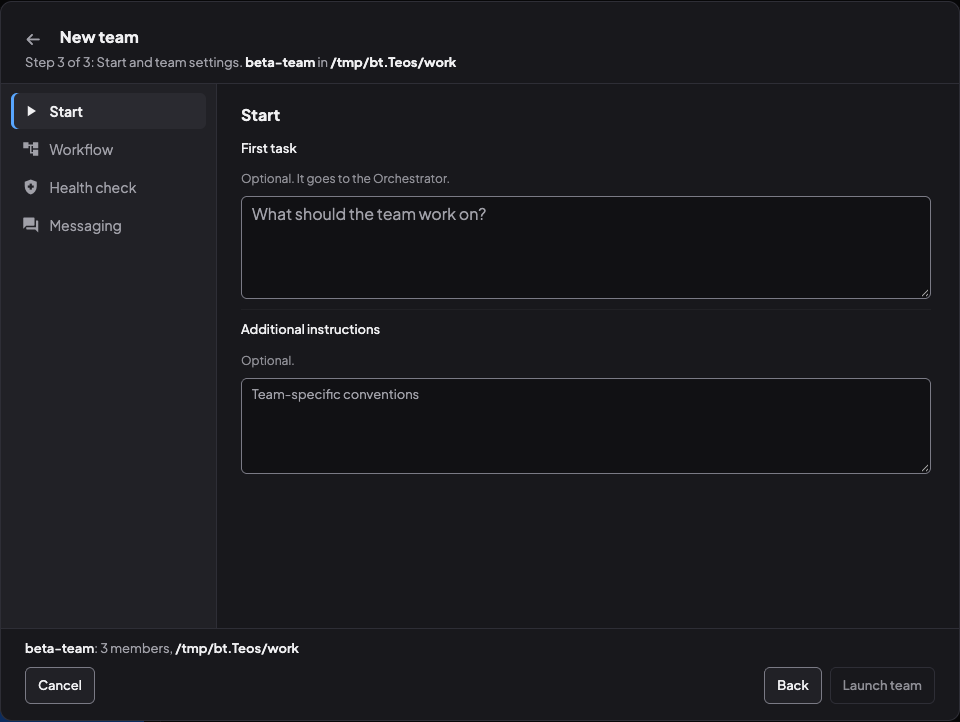
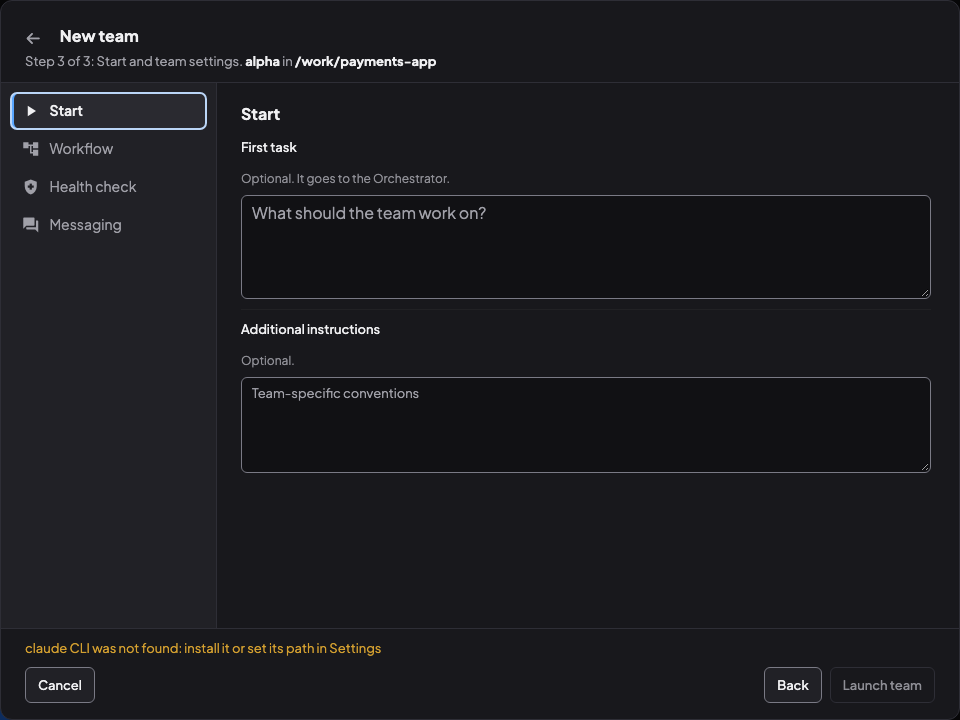
- A dead end on the first try. On the last step of New team, “Launch team” was greyed out and clicking it did nothing. The real reason, that no Claude CLI was found, sat on an earlier step the user could no longer see. Within about half an hour of the report, a fix that names the reason and the way out (“claude CLI was not found: install it or set its path in Settings”) was written, tested and approved by a reviewer. It is in our development build.
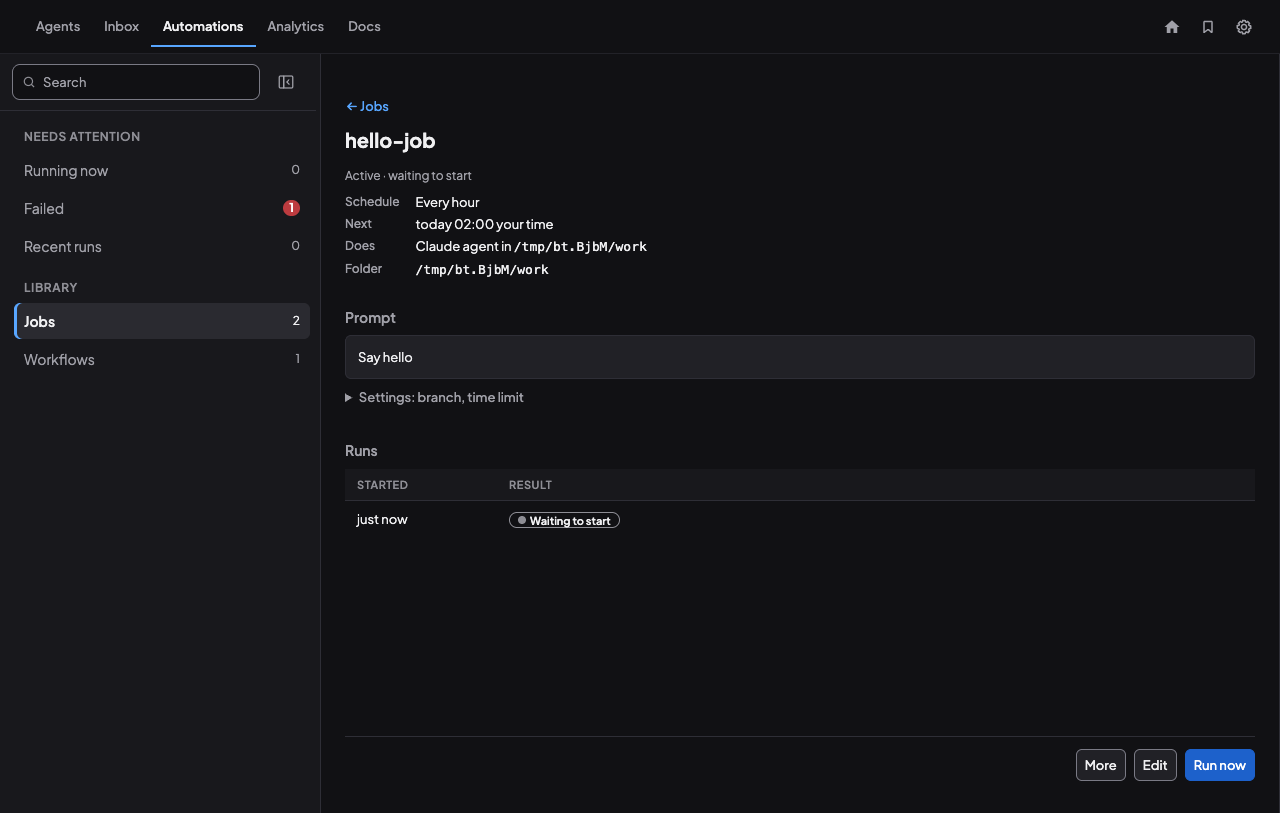
- A page that never moved. After “Run now”, a job’s page kept saying “Waiting to start” while the sidebar already showed the run as failed, with no reason given. The page only read its runs once. In our development build it follows a pending run to its end.
- A bad default. A new job prefilled the repository path with the home folder, so it failed to create. In our development build it starts empty or uses the Settings default.
- A bare error page. Reopening a used sign-in link showed one line of tiny monospace text on a black page. In our development build it is a proper page with the command to run and a button to sign in.
- Words that only insiders understand. “Persona” before it is explained, “Auto mode” with no explanation, “Busy (CPU)” on an idle machine, an Install ID that reads like an error. These are being reworded.
- Things that were already there. A tester reported “no setting for the CLI path”. The setting existed, collapsed at the bottom of a long page. The fix moves it up and shows “Claude found” on the closed row, instead of building it again.
What we learned
- Testers who have never seen the product find what the builders cannot see. Most findings were empty states, wording and order, things the team scrolls past every day.
- Separate finding from fixing. Testers report and do not propose code. A design agent turns reports into exact proposals, developers build, reviewers check.
- Keep decisions with a person. Only clear bugs and wording get built on the spot. Product choices wait for the human running the team, with the tester’s view attached.
- Close the loop with the tester. Asking “would this have unblocked you?” catches proposals that look right to the team but would not have helped a newcomer.
- Know the stand-in’s limits. A mock agent cannot hold a real conversation, so the testers say what they could not test, and a pass with a real CLI sign-in is planned with a human.
Try it on your own app
- Add an agent to your team with a newcomer persona and the three rules above.
- Give it its own throwaway copy of your app and a browser it can drive.
- Route its findings through the same board as the rest of your work.
The hardest part is not the tooling. It is resisting the urge to explain the product to it.
See also: The orchestrator pattern, How Coral runs a team, How agents coordinate without you.
Run your own agent team with Coral
Download Coral, open source. Runs directly on your machine.
Download Coral