Moving from the Codex desktop app to Coral
A practical guide for Codex desktop users who want to run several agents as a team: what to save, what carries over, and how the same work looks in Coral.
Nothing is shutting down. The Codex app is not going away, and you do not have to choose. Coral starts the codex command-line tool for you, so the Codex agent in Coral signs in the same way as any other Codex CLI. You can keep the app for solo work and use Coral when you want several agents, a task queue and reviews.
OpenAI now documents the app inside the ChatGPT desktop app, as its Codex mode. Checked Nov 9, 2026: app overview.
What you have in the Codex app
The app lets you open a project, start threads, and run each thread in your local checkout or in its own Git worktree. It has a diff pane with inline comments, commit, push and pull-request buttons, scheduled tasks that run in the background, skills, and a phone view for starting and approving work.
Checked Nov 9, 2026: OpenAI’s features, worktrees and scheduled tasks pages.
What it does well: a polished single-person window around one or a few threads, with review and pull requests built in. If that is all you need, the app is a good fit. Coral is for when you want agents with roles that share a task queue, a message board and a review process.
Step 1: Save your work in Git
We have not tested these steps on a Codex app install. They come from OpenAI’s documentation. If you find a difference, tell us.
- Commit and push what you want to keep. Codex creates worktrees in a detached HEAD state by default, so a worktree thread has no branch until you make one. Use Create branch here in the app, or
git switch -c <branch>in the worktree, then push the branch to your remote. - Know where worktrees live. By default they are under
$CODEX_HOME/worktrees. The app keeps your 15 most recent worktrees and deletes older ones, and it deletes a worktree when you archive its thread. It saves a snapshot first and offers to restore it, but pushing a branch is safer. - One branch, one checkout. Git will not check out the same branch in two worktrees at once. If you want Coral’s agents to continue a branch that a Codex worktree still has checked out, remove or archive that worktree first.
- Ignored files. Files such as
.envare not in Git. The app copies the ones listed in a.worktreeincludefile into new worktrees. Check that the files your project needs are present wherever the agents will work.
Checked Nov 9, 2026: OpenAI, Git worktrees.
Step 2: Keep your instructions
AGENTS.mdworks as it is. Coral’s Codex agents read the same files Codex reads:AGENTS.mdin the agent’s folder and the folders above it up to the Git root, then your own file under~/.codex. Coral sessions docs- Project setup actions do not move by themselves. The app’s local environments (setup scripts and top-bar actions, stored in a
.codexfolder in your project) are described by OpenAI as available only in the Codex desktop app. Coral’s docs do not describe reading them. Put the setup commands inAGENTS.md, or tell the Orchestrator what to run. - Skills. The app and the Codex CLI share skills according to OpenAI. We have not tested which of your app skills a Coral-launched Codex finds; start an agent and ask it to list its skills.
Checked Nov 9, 2026: OpenAI, local environments and settings.
Step 3: Install Coral and the Codex CLI
Coral is open source (Apache-2.0). Download it from GitHub Releases: Coral.dmg for macOS, Coral-x64.msi or the portable zip for Windows (not code-signed, so SmartScreen warns about an unknown publisher), or a tarball for Linux. On Linux, Coral is the command-line server and browser dashboard only; there is no desktop app, and you install tmux yourself.
Coral drives agent tools; it does not install or sign in to them. Install the codex command-line tool from openai/codex and sign in by OpenAI’s instructions. You also need Git.
Coral: quickstart, checked Nov 9, 2026.
The screenshots in this guide are from Coral v2.0.59. If you use another release, some labels may differ.
Step 4: Start a team
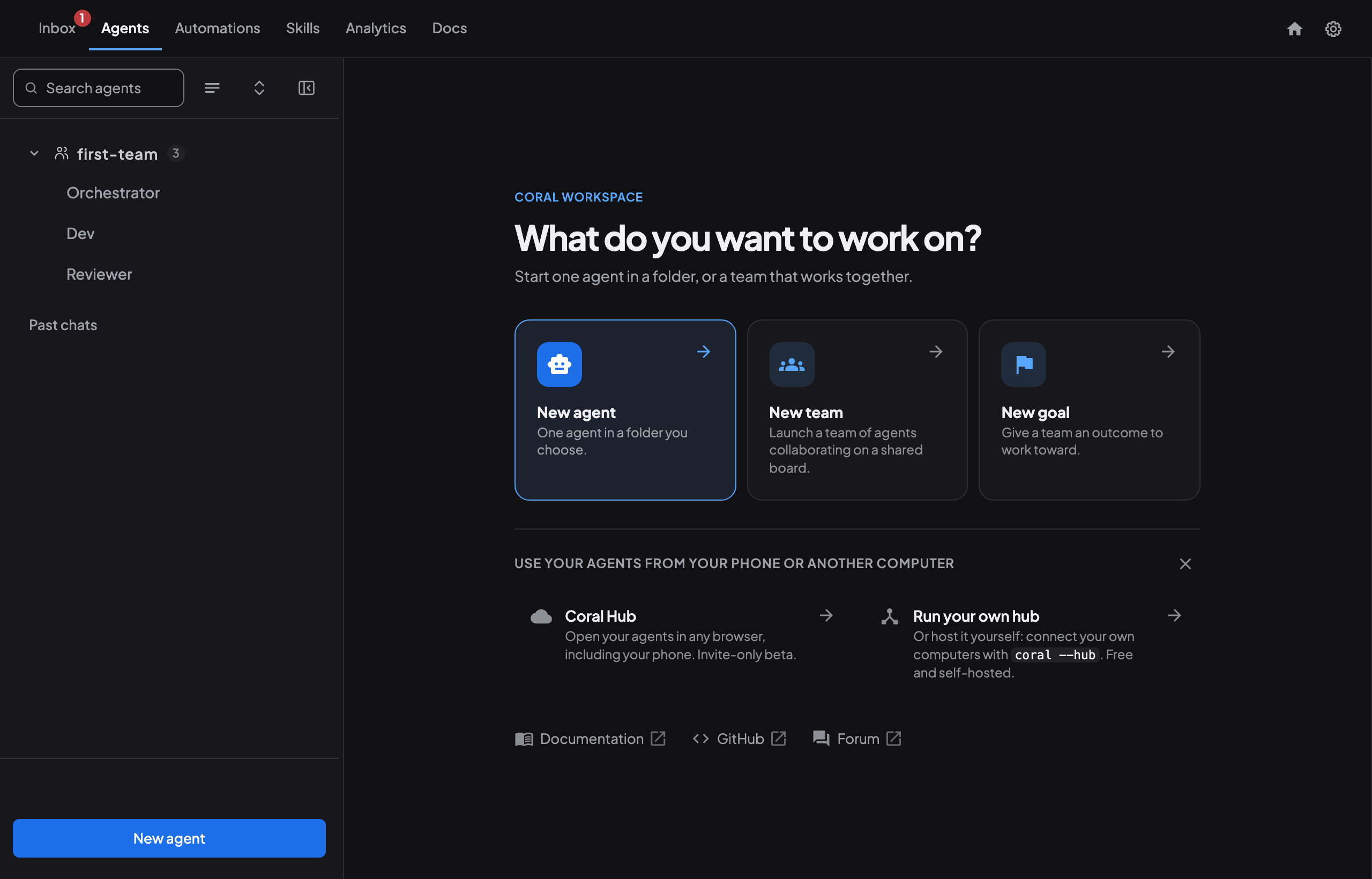
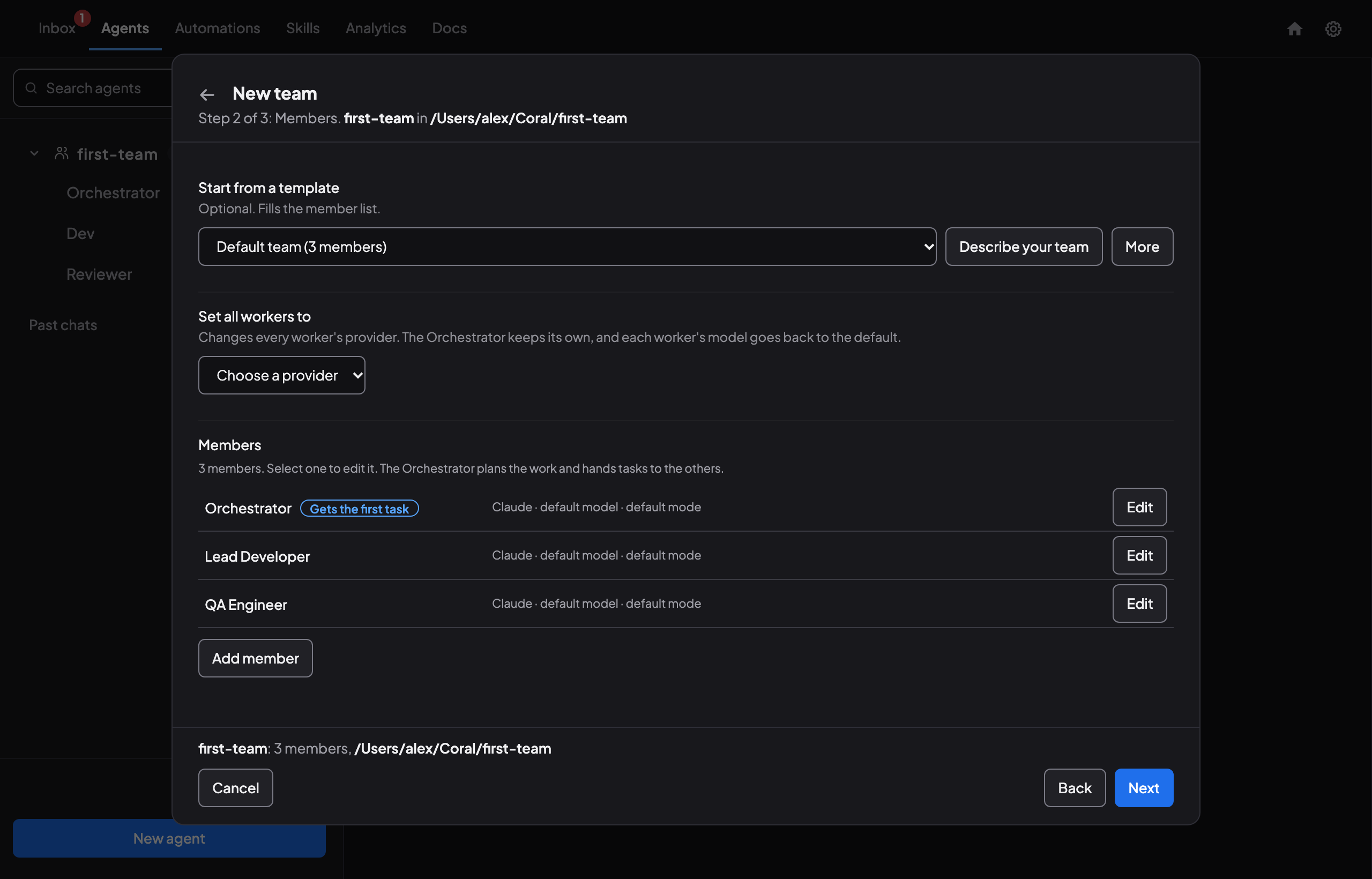
Where the Codex app has a project with threads, Coral has a team. Open Coral, choose New team, name it and pick your repository folder. In the members step, start from the Default team (3 members) template (Orchestrator, Lead Developer and QA Engineer), describe the team you want, or launch an Orchestrator and tell it in chat which teammates you want. When you add an agent, pick Codex as its agent type.
To work as the app’s worktree threads do, open Settings on the team page and set the working mode to Worktrees, so each agent works in its own Git worktree and branch.
A different default. A Codex agent that you launch from Coral’s dashboard with no mode chosen starts in Coral’s Auto mode: Codex’s workspace-write sandbox with approvals off, and with network access on so the agent can reach Coral. If you want the app’s ask-first behaviour, choose a mode that keeps approvals when you launch. Coral sessions docs
Coral: teams and teams and tasks, checked Nov 9, 2026.
Step 5: Recreate your scheduled tasks
The app’s scheduled tasks use RRULE schedules, start a new chat for each run, and need your computer on with the app running. In Coral they are scheduled jobs: you give a name, a five-field cron expression, a time zone, the repository and base branch, and a prompt. A job can instead trigger a saved workflow. Jobs have a time limit (one hour by default), and Coral can remove the run’s worktree when it finishes. There is no import, so retype each prompt and translate each schedule.
Checked Nov 9, 2026: OpenAI, scheduled tasks; Coral scheduled jobs.
Step 6: Give the agents work, then review it
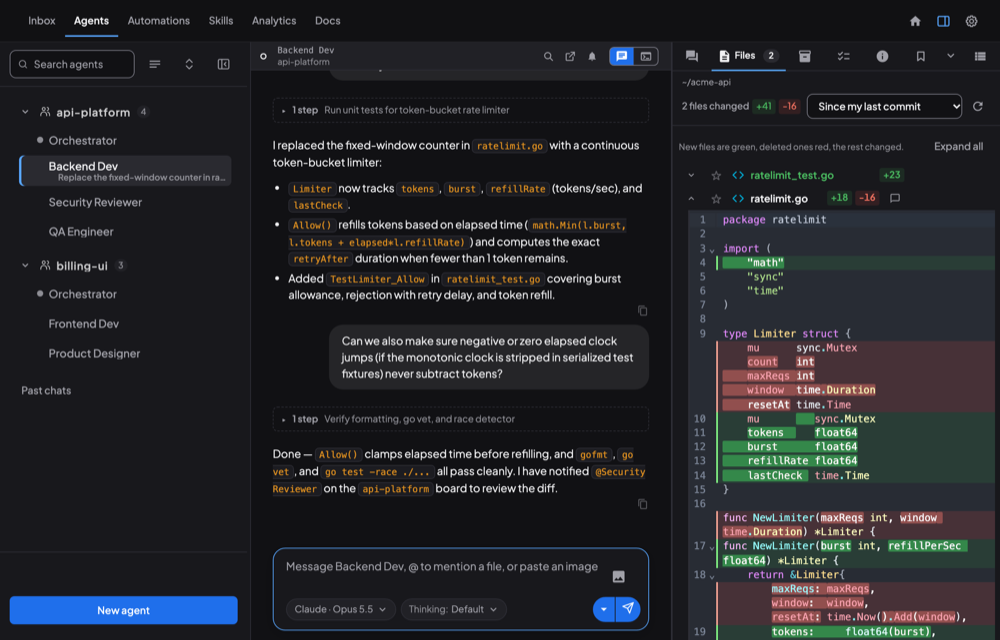
- As in a thread, you can type a task into an agent’s chat. Coral also has a task queue: the Orchestrator creates tasks with priorities and dependencies, agents claim them and hand back results with files attached.
- The team’s Board tab shows messages and progress. Needs you in the Inbox lists questions and reviews waiting on you.
- For code changes, use Coral’s built-in git diff viewer. To merge, ask an agent to do it or open its terminal. Where the app has a commit-and-pull-request button, Coral has no equivalent button in the docs we read; ask the agent to commit, push and open the pull request.
Coral: task workflows, board, completion review, checked Nov 9, 2026.
What happens to your old threads
We could not confirm from OpenAI’s documentation where the app keeps thread history on disk or whether threads can be exported, and Coral’s docs describe no way to import Codex app conversations. We have not tested whether they show up in Coral’s All chats list. Treat old threads as reference material: copy any decision or note you still need into your repository before you archive them.
Coral: how do I (finding and continuing chats), checked Nov 9, 2026.
The Codex app and Coral, term by term
| Codex app | Coral | Notes |
|---|---|---|
| Project | Team / project folder | Agents on a shared message board and a shared repository |
| Thread | Agent session | Each agent has a terminal and a chat in the dashboard |
| Worktree thread | Worktrees mode | Set in the team settings |
| Handoff between local and worktree | No direct equivalent in the docs we read | Commit and push, then continue the branch in the other place |
| Diff pane, inline comments | Built-in diff viewer, review workflow | Reviews can have several rounds with reviewer agents |
| Commit, push, pull request buttons | Ask the agent | Coral’s docs describe no pull-request button |
| Scheduled tasks | Scheduled jobs | Cron schedule; a job can also run a saved workflow |
| AGENTS.md, skills | Read by the Codex CLI that Coral starts | Skills not tested |
| Phone: start tasks, approve, review | Coral Hub on a phone (closed beta); remote access with a QR code | Remote access is off by default |
| Cloud threads, Team Tasks in the cloud | No direct equivalent | Coral runs agents on your own computers |
Codex side: OpenAI’s features, worktrees, scheduled tasks, checked Nov 9, 2026. Coral side: the Coral docs linked above and remote access.
What is different
- Teams, not threads. Coral agents have roles and share a task queue and a message board. The Codex app pages we read describe no multi-agent coordination.
- Licence. Coral is open source (Apache-2.0). Your Codex usage is still billed by OpenAI under your plan. LICENSE
- Platforms. The Codex app runs on macOS, Windows and Linux. Coral’s desktop app runs on macOS and Windows; on Linux it is the server and browser dashboard.
- Teams you can put to sleep and wake. Coral teams keep their state when stopped. teams
- More to set up. The app is one window with one sign-in. Coral has more parts, and you install and sign in to the agent tool yourself.
Codex, ChatGPT, OpenAI and other product names are trademarks of their owners. No endorsement is implied. We make Coral, so read the comparison with that in mind.
Sources
- OpenAI documentation, checked Nov 9, 2026: app, features, Git worktrees, local environments, scheduled tasks, settings. These pages moved from developers.openai.com/codex/app.
- Coral: the agent docs, the published docs and the LICENSE.