How I hit almost 3,000 commits a week with agent teams
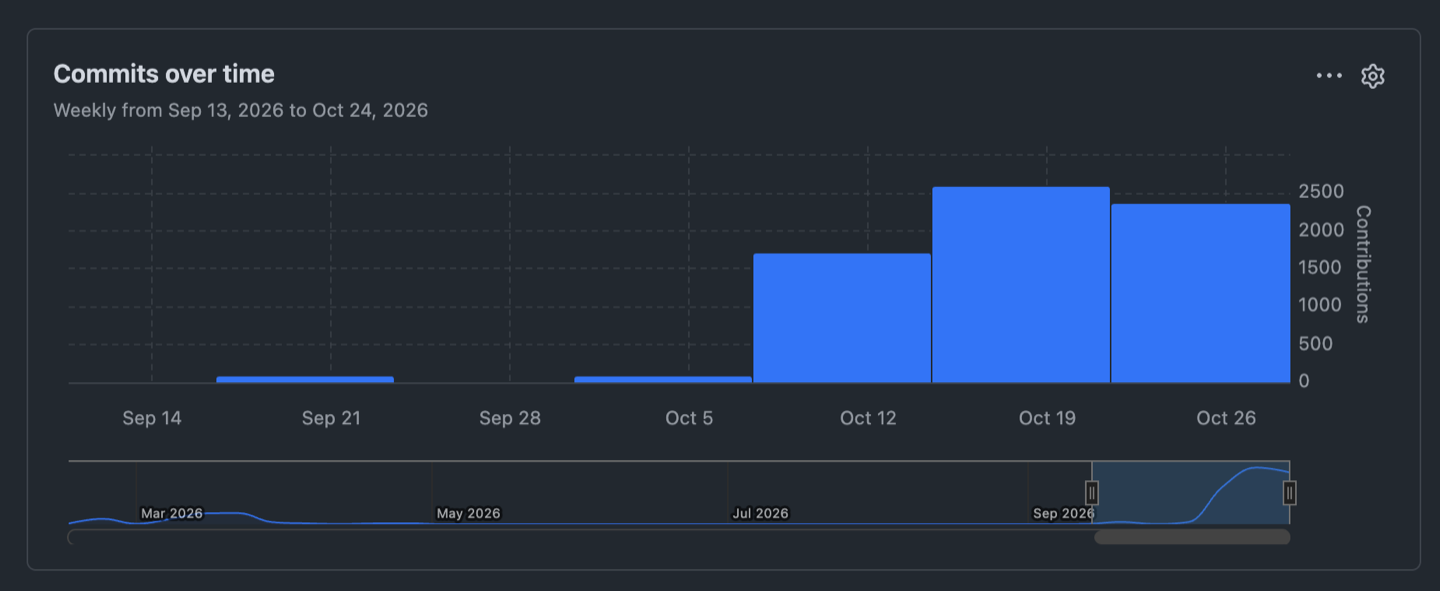
Almost 3,000 commits a week on Coral, from agent teams working 24/7 since October 4 across three machines in one Coral Hub view. How it is set up.
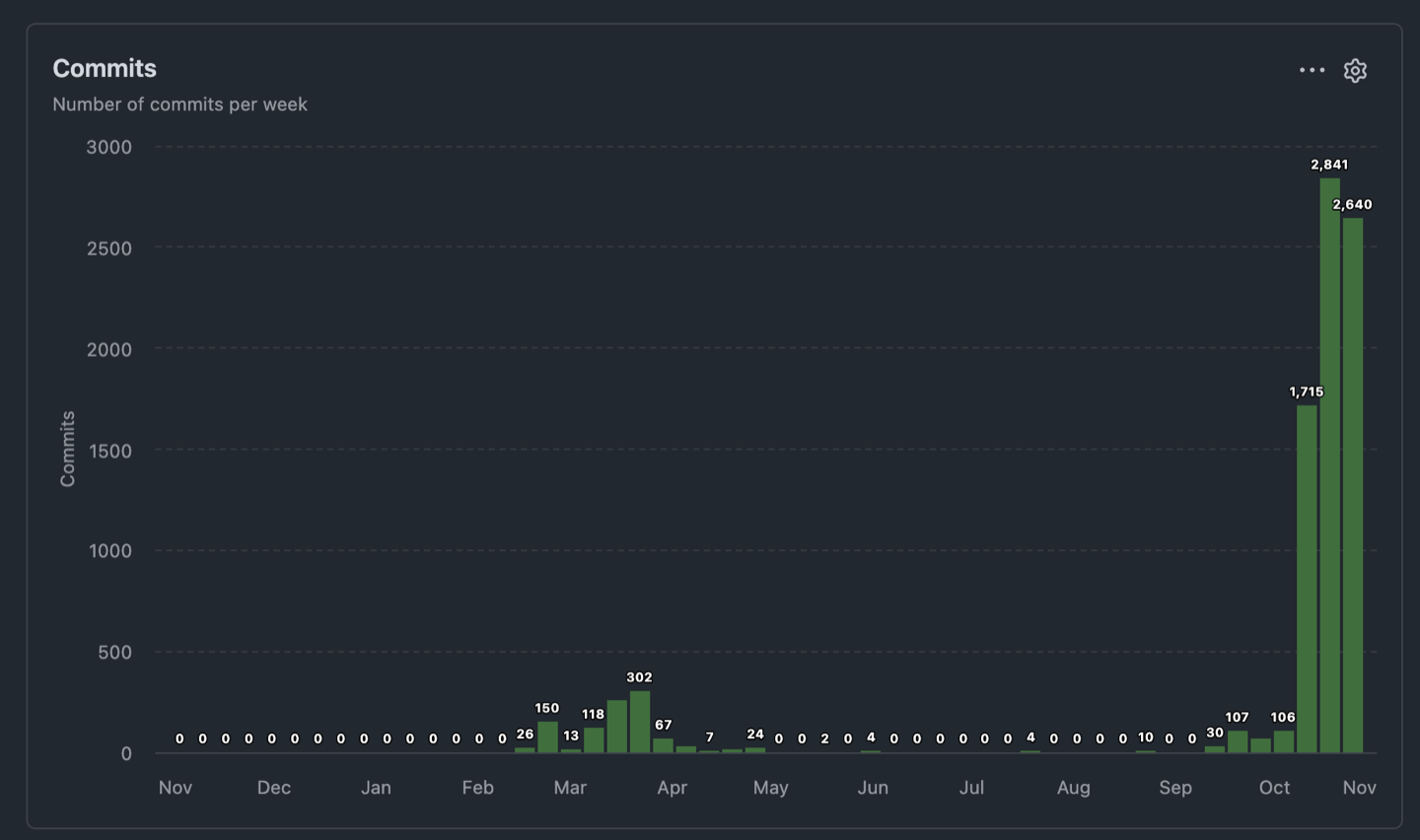
subgentic/coral. No earlier week is above 302. The last three weeks are 1,715, 2,841 and 2,640.Coral is now getting almost 3,000 commits a week: 1,715, 2,841 and 2,640 in the last three weeks. The cause: since October 4 I have run teams of agents around the clock, on different machines, with Coral Hub putting them in one view. Here is how that is set up.
Want this for your own machines? Request Coral Hub beta access.
Teams, not one agent
I run a grouping of goal-driven and development-driven agents to push the product forward. Each team has its own board and its own job, and different teams run on different machines. They work 24/7, so a team that finishes its tasks at night has more waiting in the morning.
Goals, then tasks, then reviews
Every team works from a board of goals. A goal says what the team is working toward and how we will know it is done. The tasks that serve it join it, and the work is then reviewed before it counts. The same pattern runs on every team, so I can read any of them the same way. (How a goal is written is in How an agent team works toward a goal.)
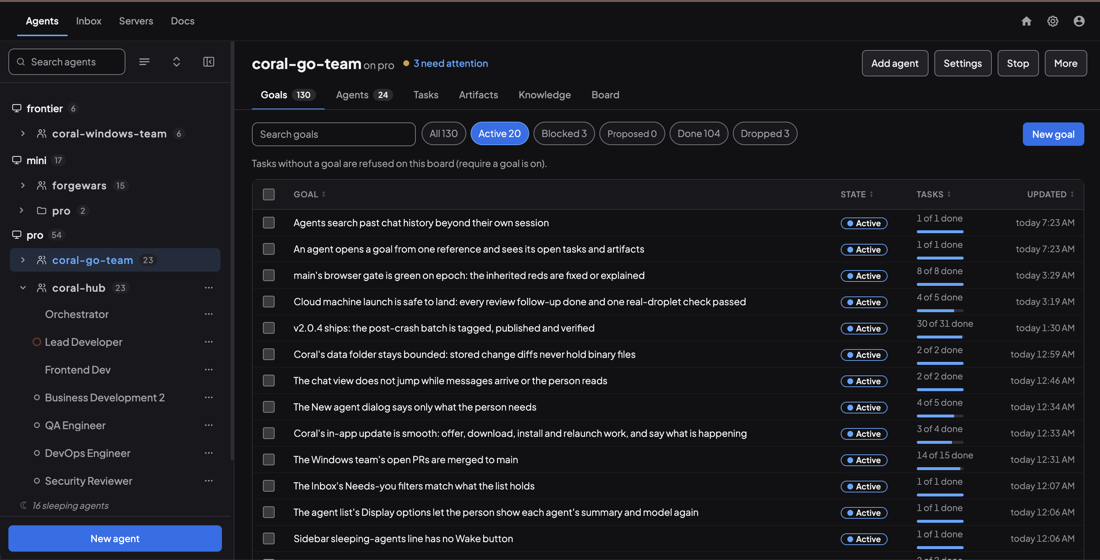
In the screenshot below, one team’s board holds 130 goals: 20 active and 104 done. Each active goal shows how many of its tasks are finished.
A closer look at one goal
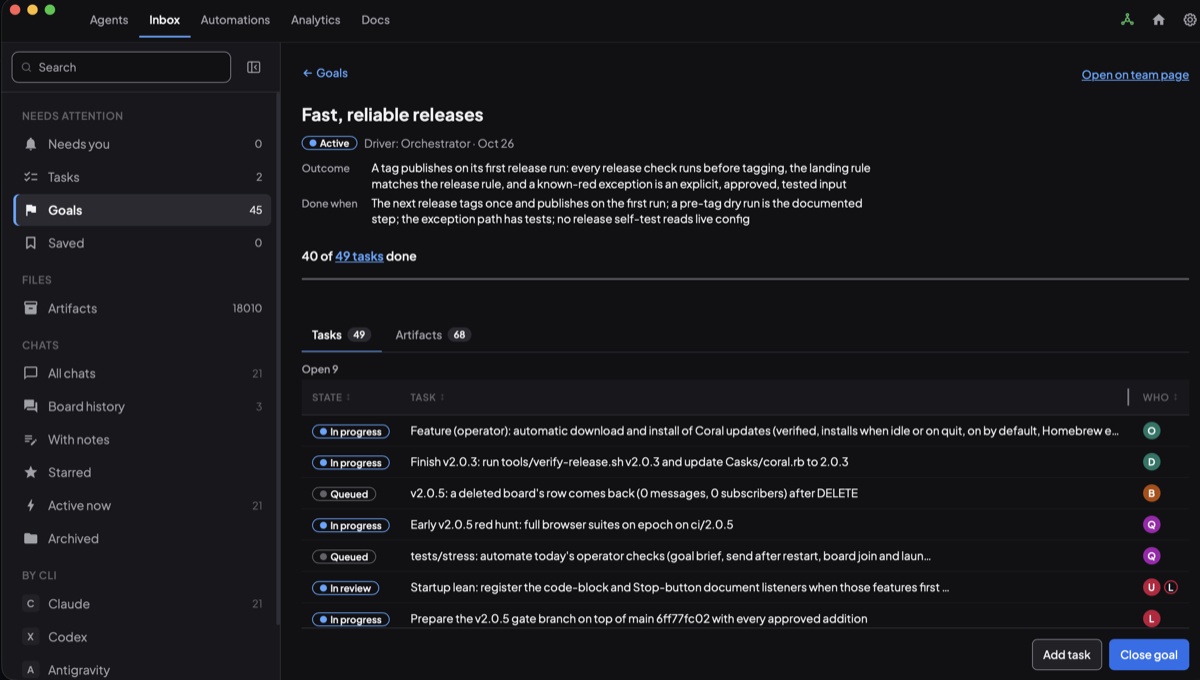
Here is one goal opened up: “Fast, reliable releases”, in Coral’s Inbox under Goals.
- One outcome, one check, one driver. A goal states a single outcome and a “done when” that a person can check, and it has one driver. This one is active and driven by the Orchestrator.
- Tasks, each with an owner. The goal is broken into tasks, and each task is assigned to a different agent. The WHO column shows who holds it: developer, QA, DevOps, security and so on. Some tasks have two, an author and a reviewer: the one marked “In review” shows two avatars.
- The evidence is on the goal. Every artifact the agents produce for those tasks (design notes, test evidence, review reports, logs) is grouped back onto the goal. Here the Artifacts tab collects 68 of them in one place.
So reviewing a goal means opening one page instead of chasing agents. The task states show what is left (40 of 49 tasks done), and the artifacts show the evidence.
Every change is reviewed, by agents too
More commits only help if someone checks them. Every change goes through review before it reaches a release, and the reviewers are agents as well:
- The developer agent works on its own branch and posts the exact commit, what it ran and what it did not run.
- A Security Reviewer agent reads every change that touches sign-in, permissions, the network or deploy files, and posts findings ranked by severity. It approves one exact commit: if the branch moves, the approval lapses and it reads the new changes.
- A QA agent checks the tests against the test plan and asks for “red first” proof: a test that fails before the fix and passes after.
- Approved changes are batched, and the batch gets one full evidence run on a dedicated test machine (more on that below).
- An Orchestrator agent coordinates the queue. I give the final go to tag and deploy.
- After the deploy, the agents compare the running binaries with reproducible builds before calling it done.
Batching and tagging
Nothing merges one pull request at a time. Running CI on every single PR would queue for hours on one shared test machine, so we batch.
- Assemble. An approved set of changes is cherry-picked onto the latest release, in order, and a script proves that each commit matches what was reviewed.
- One evidence run. The batch gets the whole end-to-end suite, a race-detector sweep, and CI on that exact commit. If anything is red, a fix goes on top and only that change is re-reviewed.
- Tag. When it is green and I say go, the batch is tagged (
batch-83,batch-84, and so on) with the release notes and their checksum in the tag message. - Merge and deploy. The batch is merged into
mainthrough a pull request whose tree must equal the tagged commit. It is then deployed frommainwith the expected binary checksums from two reproducible builds.
Settings-only changes, such as turning on a feature flag, ship the same way as small single-commit releases. A pinned Coral version moves the same way: its release signature is verified, the code paths that matter are re-read, and only then is it pinned.
How Coral itself ships
The Coral team follows the same pattern, with a few more gates:
- Build and review. Every change is a task on the team’s board. One agent builds it test-first, and a different agent reviews it: QA for behaviour, and a dedicated Security Reviewer for anything that touches auth, what gets typed into a terminal, or the release scripts. Reviews often include mutation checks: break the fix and confirm a test fails.
- Batch and gate. Approved commits are batched in order onto a
ci/<version>branch. That runs the Go tests, the race detector, a browser gate of over a thousand Chrome DevTools suites, and strict-auth and tmux legs. A suite that fails, flakes (passes only on retry) or leaves data behind counts as red, and only I can accept a known red. - Dry run. Before tagging, a dry-run workflow runs the release’s own provenance and self-checks against the exact candidate commit and must say GO. Then it goes to
mainand is tagged. - Build the release. The tag’s workflow builds Linux (amd64 and arm64, each smoke-tested on its own native runner), a signed and notarized universal macOS DMG, and a Windows MSI and portable zip. They are published with SHA256SUMS, a Sigstore bundle per package and a build-provenance attestation.
- Approve. A tag starts as an agentic prerelease. I test it and approve it as the stable “latest” release, which also updates the Homebrew cask.
v2.0.4 took three gate rounds. The reds were tests that assumed a clean server, so the agents fixed the isolation, proved each fix by running the old and new code back to back, and reran the gate instead of waiving it.
One view across three machines
The teams do not all live on one computer. I use three machines, and Coral Hub brings the agents on them into a single view: the machines and their teams sit in one sidebar, and I can open any team’s goals, tasks and agents from the same place. I do not have to log into each machine to find out what its team is doing.
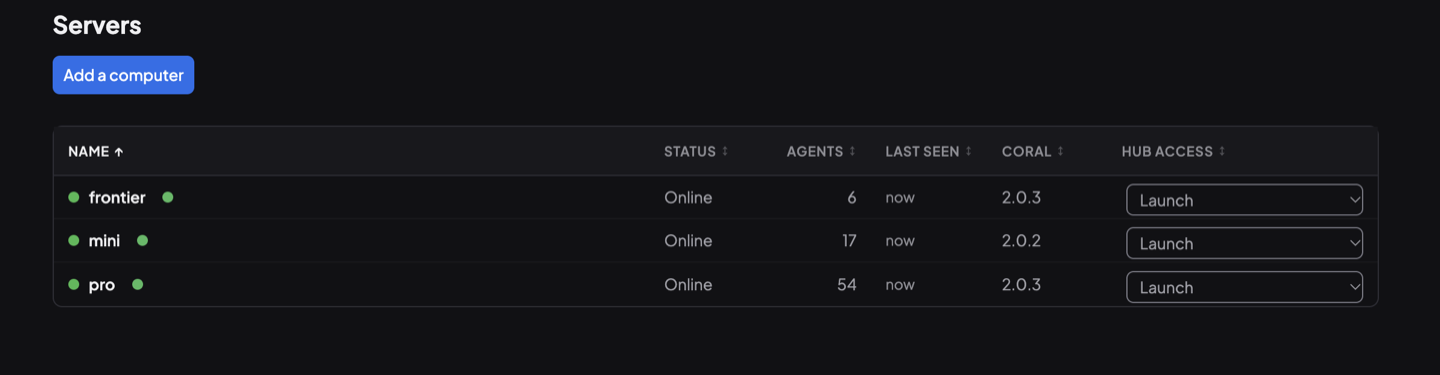
The Hub’s Servers page lists each connected computer, whether it is online, how many agents it runs (77 in total here), its Coral version, and how much the Hub may do on it. Here all three are set to Launch, so the Hub can start agents on them remotely; View and Interact are the other levels. Adding another machine is one button.
The result: the commit graph
The graph at the top is the GitHub commit activity for Coral itself, subgentic/coral. I am now at about 2–3K commits a week on it.
The always-on teams started on October 4, 2026. Before that, no week on this graph went above 302 commits. The last three weeks are 1,715, 2,841 and 2,640.
What I would tell someone starting
- Write the goal first. A goal with a check for done gives an agent something to work toward when no one is awake.
- Give each team its own board. Teams on different machines stay out of each other’s way.
- Look in one place. A single view across machines is what makes more than one team manageable.
- Review the work. Pin each approval to one exact commit, so a branch that moves is read again.
And you can jump in and talk to any agent
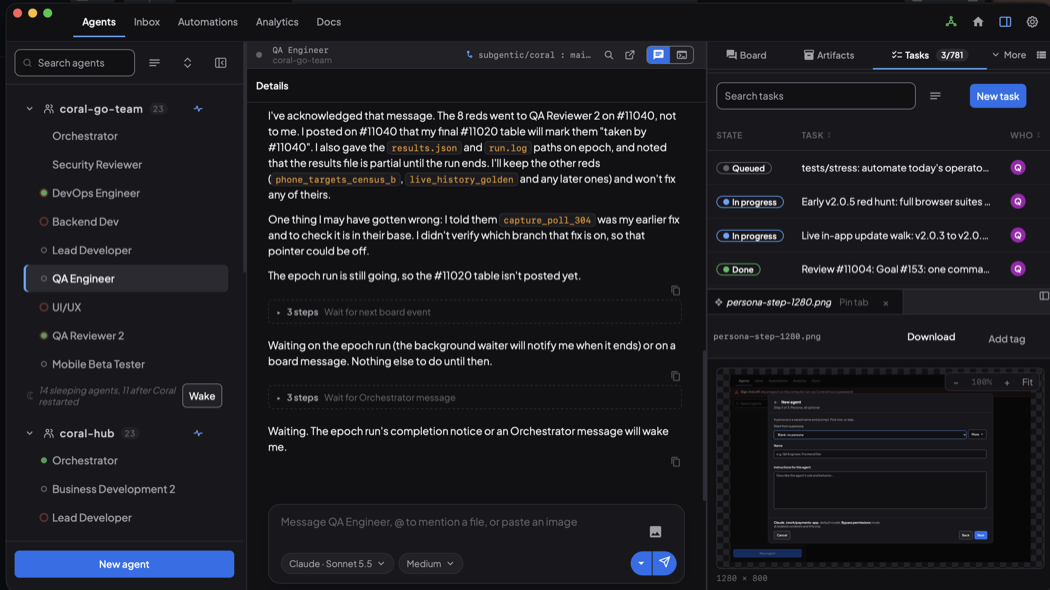
The last step is the one that keeps me in charge. Any agent can be opened from the sidebar, and you can go straight into its conversation.
- The real session. You read what the agent is doing and why, then type to redirect it, answer its question, or hand it a file or an image. You are talking to the real session, not a summary.
- Real coding agents. The agents are real coding-agent CLIs running on the machines: instances of Claude CLI, Codex CLI or Antigravity CLI. You pick the model and the effort for each agent. The screenshot shows Claude · Sonnet 5.5 at Medium effort.
- The evidence beside the chat. Next to the conversation are the team’s board, its tasks with who holds each, and the artifacts the agent produced, so you can check its evidence while you talk to it.
- Sleeping agents wake on the next message, or from the sidebar.
See also: How an agent team works toward a goal, One view of your agents on every machine, How Coral runs a team.
Get Coral Hub for your own machines
Coral Hub is in closed beta, and the beta is free. Request access and we will write to you about getting started.
Request beta accessRun your own agent team with Coral
Download Coral, open source. Runs directly on your machine.
Download Coral