Tuning the Harness: How Coral's Health Monitor and Analytics Let Agents Improve Operations
Coral's vision is to make observing and guiding what agents are doing easier for humans. A better model and CLI comes out every single day, but how users interact with model providers can be boiled down to a clean workflow with Coral—allowing you to pick the best model for each role based on price and performance without changing how you work.
That stable workflow matters most once a team of coding agents runs for hours on a shared repository. Multi-agent work rarely fails with a loud crash; it stalls quietly. An agent sits at a permission prompt, a review waits behind a busy teammate while another reviewer is idle, an agent replies in chat without putting a question in the Operator's Inbox, or a task runs three times longer than usual with no update. Fixed timers and polling loops make this worse: they burn tokens when nothing has changed, push agents to post filler updates just to reset a clock, and flood the board with duplicate notices.
In Coral (v2.1.5), we pair a tunable board health monitor with built-in analytics. Instead of hard-coding timeouts in source code, every health rule exposes typed settings over a local CLI and API (coral-board health settings), compares each agent against its own historical baseline, and logs every change. Here is how the health monitor works, how we evolved our harness from real team signals, and how you can apply the same pattern in your own agent workflows.
1. How the Health Monitor Works: Nudges vs. Judgment Items
Coral separates routine nudges from items that need an orchestrator's judgment. Both go through Coral's typing gate—so an agent is never interrupted mid-turn or at a dialog—and agents never poll the board.
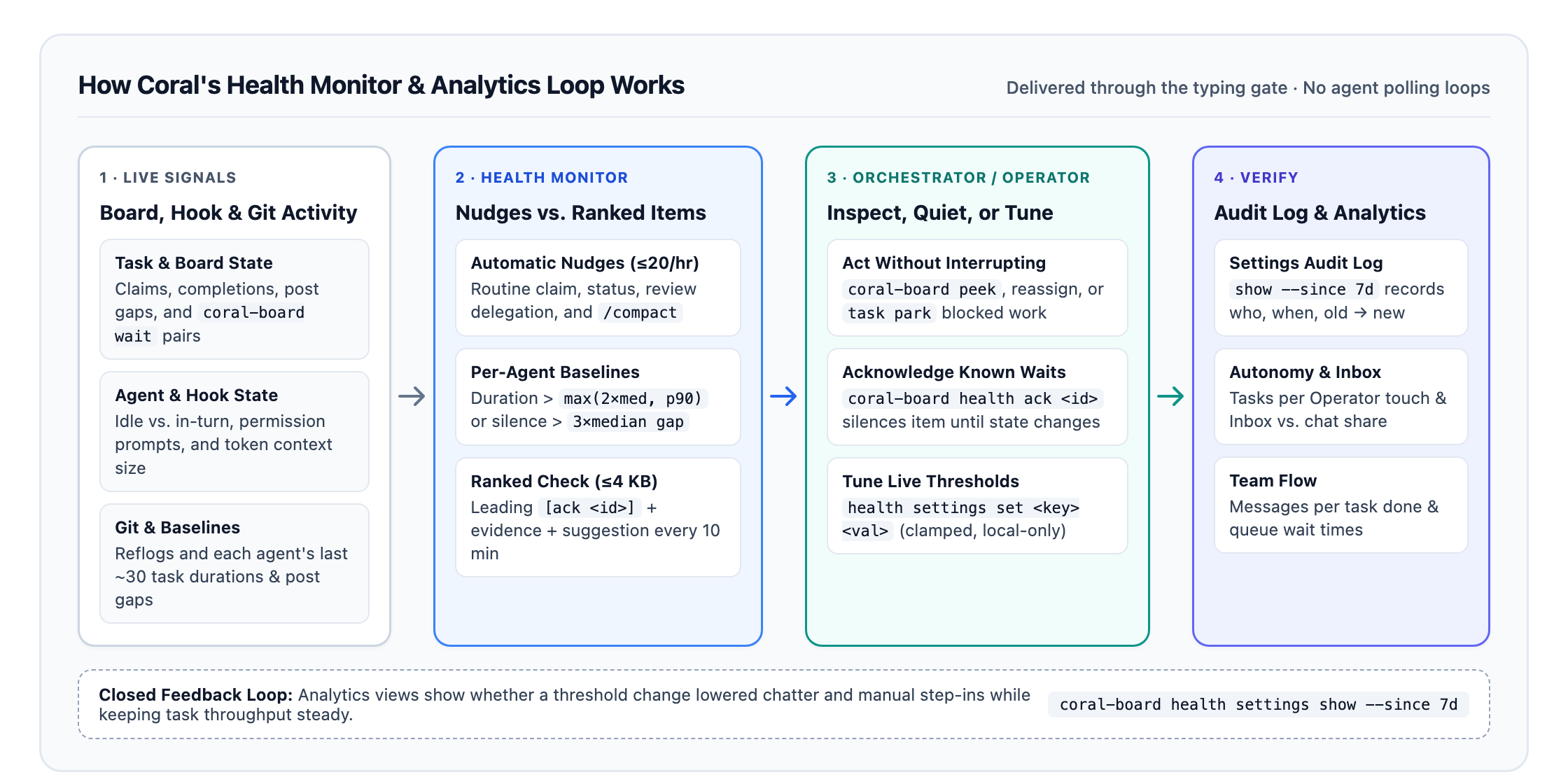
First, Coral sends automatic nudges on its own (up to 20 per board per hour):
- Review delegation (
auto_delegate): Assigns named reviewers when a task enters review, or picks the least-busy reviewer fromreviewer_poolbesidedefault_reviewers. - Claim nudges (
claim_nudge): Nudges an idle agent that has not claimed its top assigned task afterclaim_nudge.after_min(10 minutes), repeats up toclaim_nudge.nudges(2), then escalates. - Status nudges (
status_nudge): Asks for a one-line status afterstatus_nudge.after_min(20 minutes) of task silence, then escalates afterstatus_nudge.escalate_after_min(10 more minutes). - Context compaction (
compact_context): When an idle Claude agent passescompact_context.threshold_k(225k tokens), Coral triggers/compact(or/clearwith a handoff note after a task) so the next task starts clean.
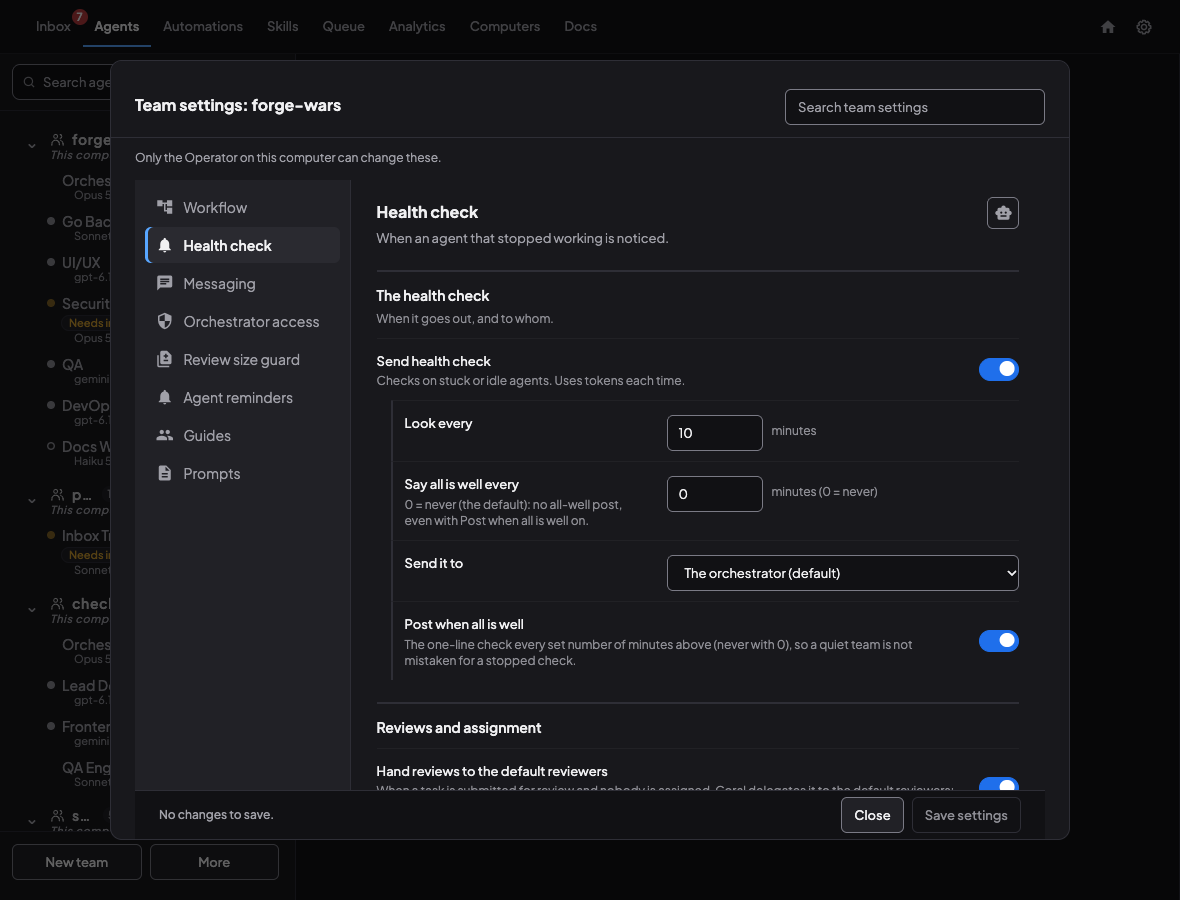
Second, every interval_min (10 minutes by default), Coral types a ranked health check (at most 4 KB) to the Orchestrator. When heartbeat_min is 0 (the default), it sends only when something changed. Each item starts with [ack <id>], the evidence, and a suggestion:
- Escalated claim or status nudges, or an agent stopped at a dialog (
held_notice). - Idle agents with no work, or reviews waiting in the pool (
pool_review.after_min, 15 minutes) while another reviewer is free. - Off-the-books work (
busy_no_task,post_no_task,upload_no_task): working 10+ minutes in a turn, posting a commit SHA, or uploading an artifact with no active task. - Unanswered
@mentions(mention_renudge), open--askquestions (ask_reminder), oversized goals (goal_size.limit), unowned tasks (unowned_tasks), or work waiting to land (landing, off by default) or ship (release, off by default).
Before interrupting a teammate, the Orchestrator can peek at its recent activity without waking it, or acknowledge an item so it stays off future checks until its state changes:
# Check an agent's progress without interrupting its turn
coral-board peek "Backend Dev"

# Mark a health item handled; it stays off the check until its state changes
coral-board health ack a4f91c2e

# List every open item from the last check, including items cut by max_items
coral-board health list
If a task waits on an outside event, the Orchestrator parks it (coral-board task park <id> --reason "...", up to park_limit, 3 by default). Parked tasks raise no health items and get no nudges.
2. Each Agent's Own Baseline Instead of Fixed Timeouts
A fixed 15-minute timeout is too noisy for a deep backend change and too slow for a quick check. Task times also have a long tail, where one big run skews a simple average.
Coral's deviation rule (deviations.on, on by default) uses medians and percentiles from each agent's own board history:
-
Task duration (
A): Over an agent's last ~30 completed tasks (or the team's numbers if the agent has under 5), Coral flags anin_progresstask pastmax(2 × median, 90th percentile): >[ack 8c31d04a] Backend Dev: #118 has been in progress for 1 h 45 min; the usual is 35 min (median of its last 24, 90th percentile 52 min). Suggest: check on it -
Silence on a task (
B): Agents post at different cadences. Coral measures the gaps between a task's claim and posts naming#<id>. With at least two gaps, it flags silence past3 × median gap: >[ack 19b0e712] Frontend Dev: silent on #122 for 38 min; its usual gap between posts on it is 9 min (median of 4). Suggest: ask for a status -
Pairwise waits (
C): When Agent X waits on Agent Y (coral-board wait), Coral checks the last 30 answered waits for that pair (requiring at least 3) and flags a wait past2 × median.
Each deviation fires once at the threshold and again only at each doubling (2×, 4×, 8×). Counters survive restarts and clear when the task or wait ends.
3. Real Examples: How We Evolved the Harness from Board Signals
Running dozens of goals through the monitor showed us where rules misfired or caused extra posts. Instead of editing prompts by hand, we removed duplicate prompts and turned fixed thresholds into live settings with defaults matching existing behavior.
Example 1: Stopping the "Goal Looks Done" Echo Chamber
When a goal's tasks finished, Coral used to say so in three places at once: a 15-minute warning notice to the goal's driver, a goals_ready line in the health check, and a "Goal looks done" row in the Operator's Needs you inbox.
Looking at the board and the Team communication view, we saw agents posting extra updates—and even adding filler tasks—when a goal finished. The 15-minute notice read like an order to act, and the health check kept repeating it.
We cut three prompts to one:
- Needs you owns the close decision: We removed the duplicate
goals_readyhealth-check line and nudge while keeping old saved settings loadable. - Permission to do nothing: The driver gets one quiet heads-up asking for no reply ("If more work is planned, add it with task add --goal N; otherwise do nothing: it goes to the Operator in 15 minutes"), recorded in
health_actionsso it is not repeated for that goal within 24 hours. - Docs aligned: We removed instructions in
agent_docs/board.mdand the default orchestrator prompt that told agents to post--askwhen a goal looked done.
Example 2: Adding a Floor to Fast-Agent Deviations
During release testing, QA Reviewer 2 ran a video check with timed comments. It took 22 minutes. Because QA Reviewer 2's recent history was mostly 1-minute checks, the deviation rule flagged it at 22 minutes against a 1-minute median.
Twenty-two minutes on a video check is not stuck work. We then added three keys to deviations (at defaults 0, 100, and 0 on our board):
deviations.min_age_min(0to1440minutes, default0): a floor under which nothing is flagged, however short the agent's median is.deviations.factor_pct(100to1000%, default100): scales the usual threshold up for heavier work.deviations.min_samples(0to50, default0for the rule's own minimums of 5 tasks, 2 gaps, 3 waits): requires more history before flagging.
We added these keys so a team with fast reviewers can set a floor—for example, 30 minutes—to suppress short-median false alarms:
coral-board health settings set deviations.min_age_min 30Example 3: Exempting Status Replies from operator_wait
Coral's operator_wait rule catches a common stall: an agent says in a post or chat that it is waiting on the Operator, but forgets --ask "@Operator ..." or a "for review" file tag, so nothing reaches Needs you.
When our Orchestrator posted a status reply to the Operator noting which teammate held a task, the rule saw @Operator with no --ask and nudged the Orchestrator ten minutes later.
We then added operator_wait.on (default on), operator_wait.grace_min (1 to 120 minutes, default 10), operator_wait.chat_max_age_min (5 to 1440 minutes, default 60), and operator_wait.authors_exempt (up to 8 member names, empty by default on our board) so a team can exempt roles that post status updates to the Operator without asking a question:
coral-board health settings set operator_wait.authors_exempt "Orchestrator"Example 4: Putting [ack <id>] First and Recovering Cut Items
When a busy check hit the 4 KB cap, a cut line ("Su...") could lose its trailing [ack <id>]. We moved [ack <id>] to the start of every item, added action_list.max_items (0 for as many as fit, up to 50; 0 by default on our board) so a team can cap one check's length, and added coral-board health list to print every open item—including any cut by max_items. Rules wired for verbosity and routing also expose <rule>.text (short, normal, long from fixed templates on unowned_tasks, goal_size, busy_no_task, and pool_review) and <rule>.to:
# Show every key, its value, default, range, and the last 7 days of changes
coral-board health settings show --since 7d

# Example: a team can cap each check and use short lines on a wired rule
coral-board health settings set action_list.max_items 10
coral-board health settings set pool_review.text short
Only the Orchestrator or the Operator on the local computer can change health settings; worker agents and remote requests are refused, bad values are rejected with the accepted range, and every edit is logged. Teams can also add custom scheduled checks (coral-board health check add) that run small scripts and print JSON lines; nothing runs until the Operator clicks Approve in Needs you on the local computer, where the script's text, SHA-256, arguments, schedule, and --may-write flag (off by default) are shown and snapshotted.
4. Watching the Effect in Coral Analytics
Coral's Analytics views in v2.1.5 (available locally and to the computer owner through Coral Hub) show where work slows down and whether a harness change helped—and let you compare models and CLIs by price and speed inside the same workflow:
- Overview & Usage: Spend, tokens, cache reads, requests, cost per request, and daily stacked bars by agent, team, agent type, model, or goal, with a drill-down into an agent's biggest turns.
- Operator interaction: Operator board posts, typed messages to agents, posts per task done, asks to the Operator, median and slowest wait for an answer, total touches across kinds, Who needs the Operator (asks and
@mentionsby agent), and a 7-day Autonomy trend (tasks done per touch, over 7 days). - Inbox vs chat: Daily and rolling 7-day share of Operator actions taken in the Needs you inbox versus in a chat or terminal, by action kind, team, and computer vs. phone.
- Resource queue: Overlapping heavy-run minutes and slot-request posts before and since the resource queue went live, plus median and slowest 1-in-10 slot wait times and claims by resource.
- Team communication: Messages by agents (with automated notices counted apart), messages per task done, cross-team traffic, tasks handed to another agent, median reply to an ask, and a Who talks to whom
@mentionmatrix. - Tokens per commit, Task time, & Tasks: Completed and failed tasks, median claim-to-done time, and tokens or cost per commit and per task across providers, models, thinking levels, teams, agents, and branches (low-sample groups tagged
few), plus Tool and API calls under Advanced.
5. How to Use This in Your Own Agent Workflows
Whether you use Coral or build your own agent harness, five habits make multi-agent operations quieter and more reliable:
- Start with a few clear signals. Watch structured state instead of guessing from prose: assigned but unclaimed, in progress with no update, waiting on a person outside their inbox, and working with no task.
- Use each agent's own baseline, not a fixed timeout. Compare against medians and 90th percentiles over the agent's last ~30 tasks and post gaps (
max(2 × median, p90)for duration;3 × median gapfor silence), with a configurable floor (min_age_min) for fast agents. Alert once on crossing and again only at each doubling. - Let an orchestrator agent tune thresholds through a guarded API, with every change logged. Expose typed, clamped settings (
show,set,reset) restricted to the orchestrator or human operator, refuse unwired keys explicitly, use fixed text templates (short,normal,long), and log every edit (--since 7d). - Acknowledge or park instead of forcing filler work. Put
[ack <id>]at the start of every health item so handled waits stay quiet until their state changes, park blocked work, and let agents do nothing when a goal is done. - Measure before and after. Track tasks done per human touch, messages per task done, inbox share vs. chat, and overlapping heavy runs. When a threshold is tuned well, chatter and manual step-ins drop while completed work holds steady.
Run your own agent team with Coral
Download Coral, open source. Runs directly on your machine.
Download CoralKeep reading
- How Coral keeps an agent team unblockedA team of agents rarely fails loudly. Coral’s health check shows what is really happening, nudges work that stalls, and hands the orchestrator what it needs.
- Mixing Agent Types in CoralWhy one team can run Claude, Codex, Antigravity, OpenCode, Hermes and Pi side by side, and how to set it up.
- How to use Fable 5.2 without blowing your budgetOne advisor, one orchestrator, many hands: how we split work across models and where the cost and quality come from.