Mixing Agent Types in Coral: Why and How One Team Runs Claude, Codex, Antigravity, OpenCode, Hermes, and Pi Side by Side
Coral's vision is to make observing and guiding what agents are doing easier for humans. A better model or coding CLI arrives almost every week. With the newest Gemini models performing strongly alongside Claude and Codex, many developers pair Gemini with Claude to avoid relying on one provider.
Our guide to model roles focused on Claude and three tiers: a sleeping advisor for hard architecture decisions, an all-day Orchestrator, and a pool of coding and review workers. Ask the Orchestrator or edit members in Coral to mix agent types in one clean workflow, with a shared board, task queue, review gates and Needs you Inbox.
Want the step-by-step setup guide, CLI commands, and permission flag tables? Read the companion tutorial: Tutorial: Setting Up a Team of Mixed Agents in Coral.
1. Why Mix Agent CLIs Across Roles?
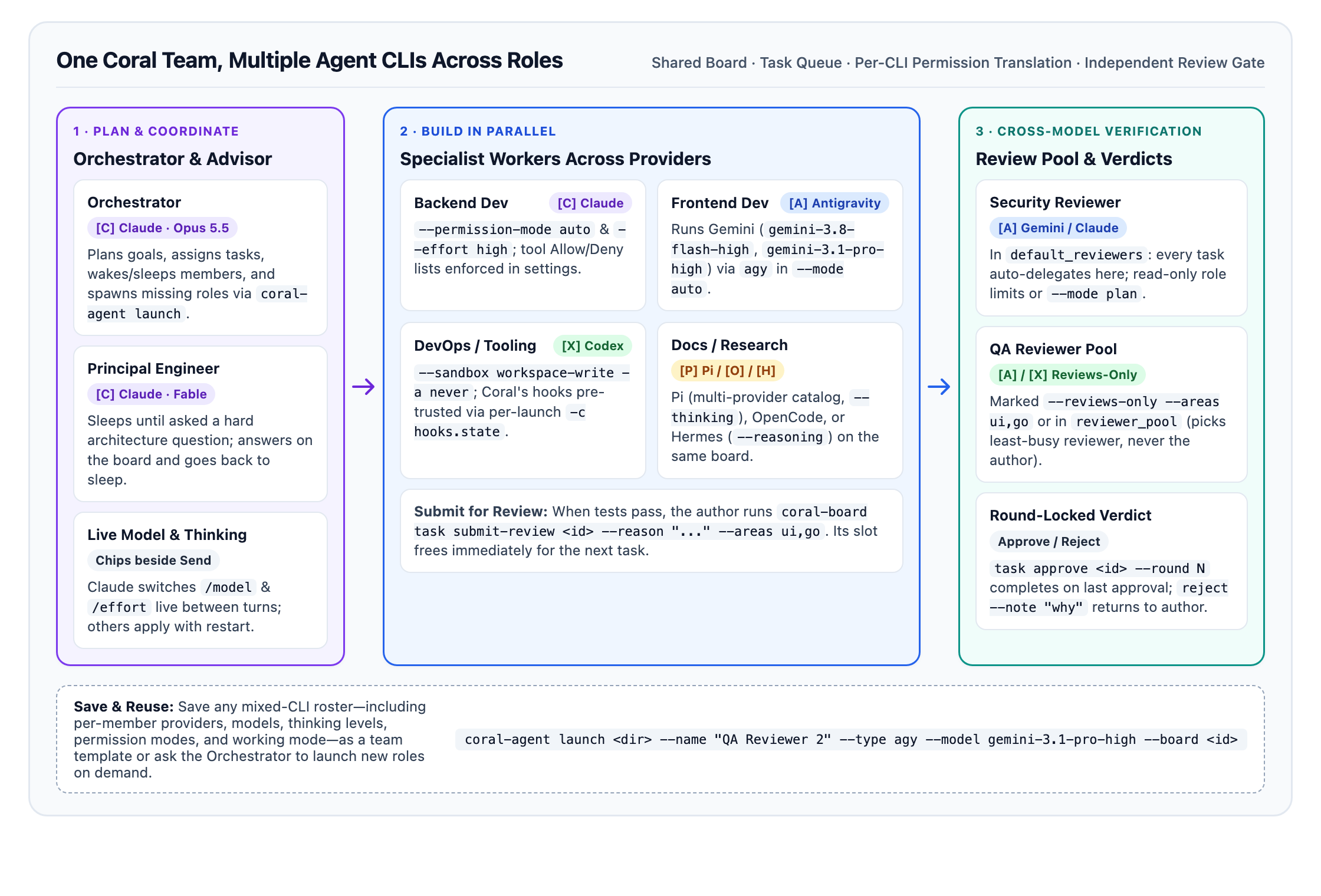
One model family is simple. Mixing agent CLIs offers three practical advantages.
- Match the CLI and model to the role.
- Claude Code (
[C]) for Orchestrator, Principal Engineer or Advisor, and Lead or Backend Developer. Use live/modeland/effortswitching, per-tool Allow/Deny lists, and the Auto mode safety classifier. - Codex (
[X]) for DevOps Engineer, Backend Dev, and QA Reviewer. Codex supportsworkspace-writeandread-onlysandbox modes. - Antigravity / Gemini (
[A]) for Frontend Dev, QA Engineer, Security Reviewer, and Technical Writer. TheagyCLI runs models such asgemini-3.8-flash-highandgemini-3.1-pro-highfor fast multimodal reasoning and a second model family’s perspective. - Pi (
[P]), OpenCode ([O]), and Hermes ([H]) for multi-provider coding, repo exploration, and Unix research when you already use those CLIs.
- Claude Code (
- Catch blind spots with cross-family review. Have Gemini or Codex review a Claude patch to challenge the author’s assumptions and catch edge cases single-family teams miss.
- Keep working through rate limits. Agents coordinate with
coral-boardandcoral-agentusing existing local CLI logins. Coral stores zero API keys. A rate limit on one vendor never freezes the whole team. Coral shows when an agent’s quota resets while the Orchestrator routes work to other providers.
2. Start by Asking Your Orchestrator in Plain English
The fastest way to build or adapt a mixed-CLI team is simply to talk to your Orchestrator. You don't have to manage every seat by hand when your workload shifts—when Let the Orchestrator manage agents is enabled on your team's Orchestrator seat (on by default for new teams), you can ask in chat:
"Spin up a second QA reviewer on Gemini 3.1 Pro High to help clear the UI review queue, and put our idle DevOps agent to sleep."
Or if Claude hits a usage window mid-sprint:
"Launch an Antigravity Frontend Dev on Gemini 3.8 Flash High and a Codex Backend Dev on GPT-5 Codex so we can keep shipping the checkout tasks while Claude cools down."
Your Orchestrator handles the rest directly on the board:
- Spawns new specialists onto the active team: The Orchestrator launches the requested CLI (
claude,agy,codex,pi,opencode, orhermes) with the right role prompt, model, thinking level, and workspace, and joins it straight to the team's board. - Sleeps, wakes, or restarts teammates as the sprint evolves: When a specialist finishes its queue, the Orchestrator can put it to sleep so it stops consuming tokens, wake a sleeping Principal Engineer / Advisor for a hard architecture call, or restart an agent cleanly between tasks.
- Drafts a mixed team from a one-sentence prompt at creation time: Even before your team launches, clicking Describe your team in New team lets you describe your project in plain English and generates a tailored roster of roles ready to launch.
- Bounded by strict guardrails and a full audit log: Every Orchestrator lifecycle action is checked against a verified Orchestrator session token, hourly launch caps, a maximum live-agent limit, and idle-time checks that never interrupt an agent mid-turn or waiting in Needs you—with every action logged in Team settings › Recent actions.
3. Configuring and Mixing a Team Manually in the UI
When you want direct, hands-on control over every seat—or want to save a signature mixed-CLI roster as a reusable template—Coral's UI makes manual configuration just as direct:
Mix Agents Across Roles on the Team Members Screen
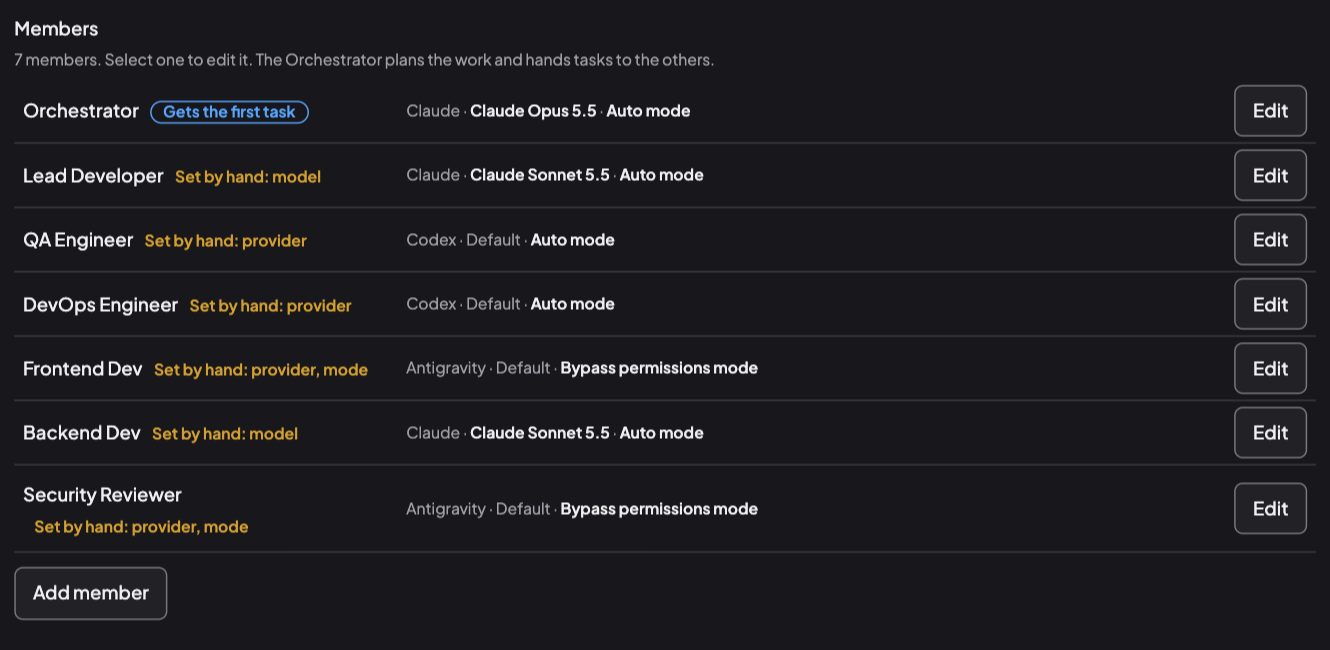
In New team › Step 2 of 3: Members, start from a built-in template like Coding Team (7 members). The Everyone runs as bar sets the baseline Provider, Model, Thinking, and Mode for the team (while showing the built-in Orchestrator summary directly underneath). From there, click Edit on any member to override its CLI, model, thinking level, or permission mode. Each customized seat displays an amber Set by hand: ... badge (Set by hand: model, thinking or Set by hand: provider, model, thinking, mode) alongside its exact one-line configuration summary:
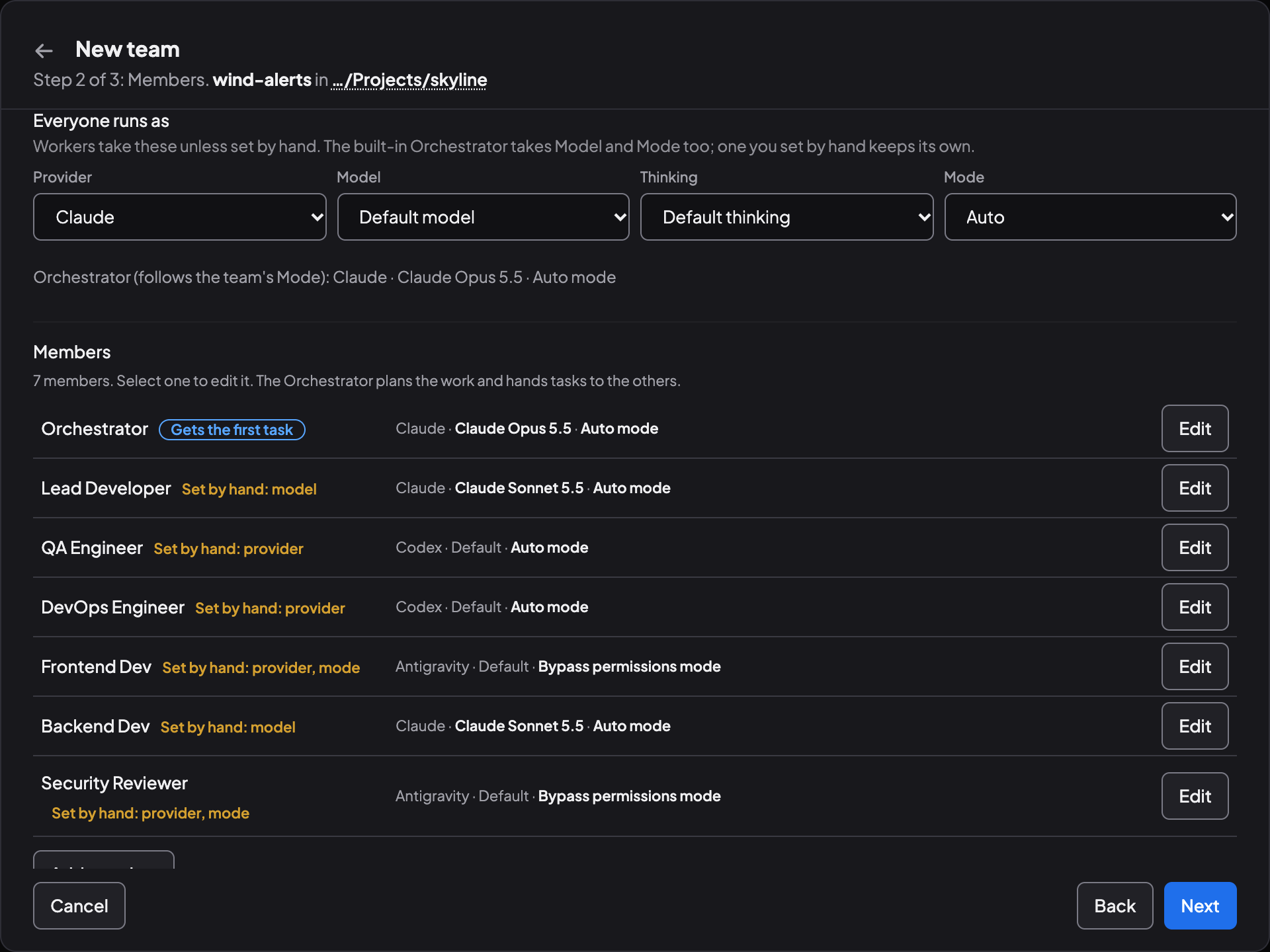
Once your mixed roster is dialed in, More › Save this team as a template saves every member's provider, model, thinking level, role prompt, and permission limits so you can launch the same mix on any repository or export it as .json.
Manually Launch a New Agent onto a Running Team
If you prefer to add a specialist yourself rather than asking the Orchestrator, click Add agent on the team page to open Add agent to <team> (Step 2 of 2: The agent). Because Coral already knows the team's workspace folder and board, you pick the role on step 1, select Claude, Codex, Antigravity, Pi, OpenCode, or Hermes under Provider, choose your Model (such as gemini-3.1-pro-high, with a Refresh models button to query the CLI live) and Thinking level, optionally attach Skills, and click Launch:
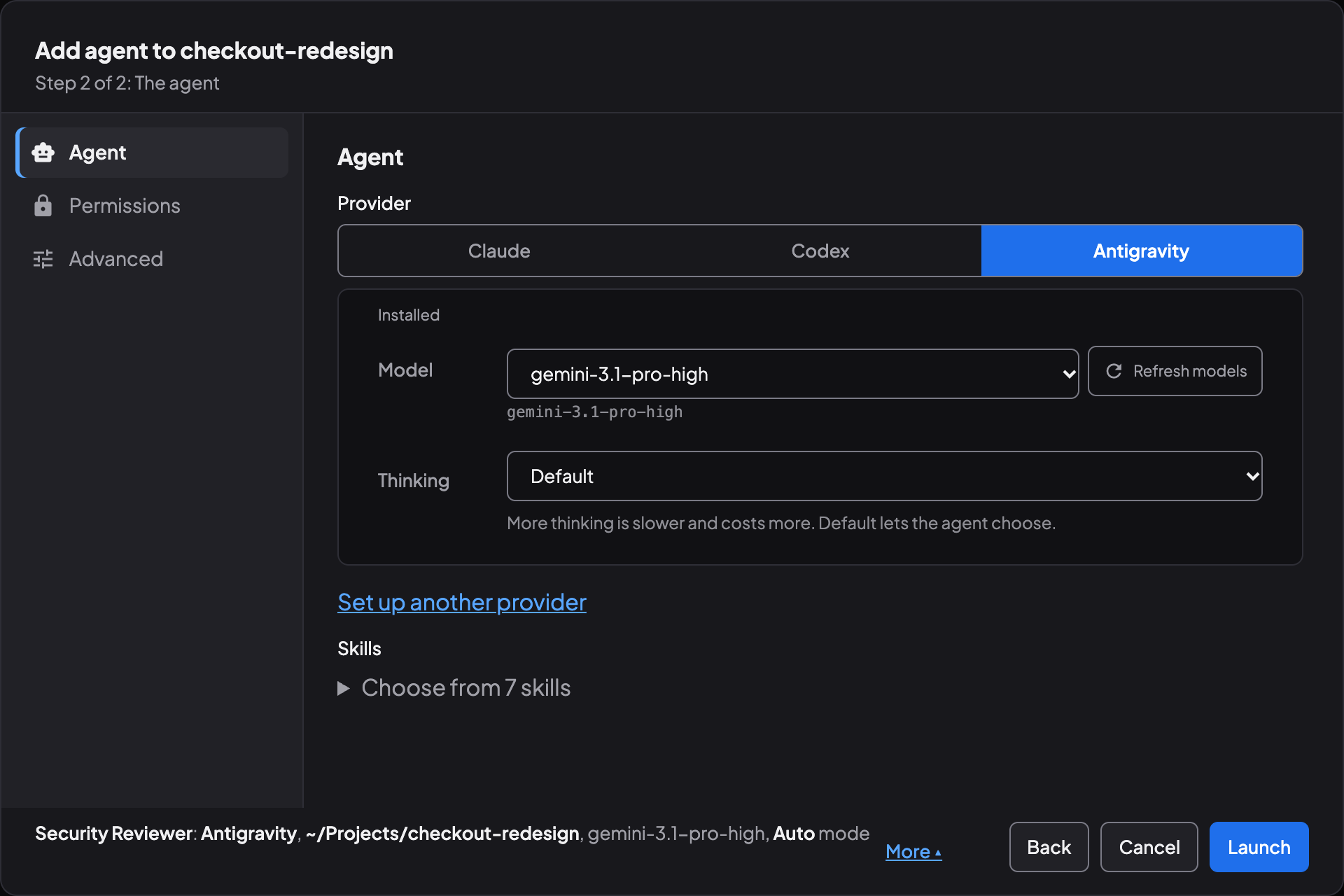
And while agents are running, live Model and Thinking chips sit right beside the Send button in chat—switching live between turns on Claude Code (/model and /effort) or opening Restart pre-filled with your choice on startup-flag CLIs like Antigravity, Codex, and Pi.
4. How Cross-Model Review Routes Automatically on the Board
Whether your mixed team was spun up by the Orchestrator or configured by hand, cross-model review routing is built directly into the board:
- Dedicated review seats and load-balanced pools: You can mark a Gemini or Codex teammate as a dedicated reviewer for specific areas (such as
ui,go, orsecurity), or place Claude, Gemini, and Codex reviewers together in a shared reviewer pool. - Automatic assignment that frees the author immediately: As soon as a Claude developer runs its tests and submits a task for review, Coral frees that developer to claim its next task and routes the review to the least-busy reviewer in the pool (never the author itself, and never a sleeping agent).
- Round-locked verdicts: Reviewers inspect the commit and either approve or reject with a required note. Because verdicts are locked to the exact review round and patch revision the reviewer read, a new push from the author automatically invalidates stale sign-offs.
5. Honest Permissions per CLI—and Seamless Codex Hooks
Different agent CLIs enforce permissions differently. Rather than hiding those differences behind a leaky wrapper, Coral translates your chosen permission mode (Default, Plan, Accept edits, Auto, Don't ask, or Bypass permissions) and each persona's Role limits into each CLI's native enforcement—and tells you in plain language under the form what that CLI actually enforces:
- Claude Code enforces granular per-tool Allow and Deny lists alongside its permission mode and Auto classifier.
- Codex and Antigravity enforce sandbox and mode boundaries, so Coral automatically narrows an agent's mode when a role only needs read access (for example, putting a read-only reviewer into Codex's
read-onlysandbox or Antigravity'splanmode). - Zero-friction Codex hook trust: Recent Codex versions block untrusted hooks at startup. Instead of mutating your global
CODEX_HOMEor passing--dangerously-bypass-hook-trust(which would blindly trust every repo hook), Coral passes a per-launch SHA-256 trust override for Coral's own lifecycle hook command so Codex agents report turn and permission status out of the box while still prompting you on any third-party hook.
Ready to set up your own mixed-CLI roster? Head over to the companion tutorial for the step-by-step walkthrough, exact CLI commands, and permission flag reference.
Run your own agent team with Coral
Download Coral, open source. Runs directly on your machine.
Download CoralKeep reading
- Tutorial: Setting Up a Team of Mixed Agents in CoralPut Claude, Codex, Antigravity, OpenCode, Hermes and Pi on one team: choose the agents and models, set up cross-model reviews, and let the Orchestrator launch agents.
- How to use Fable 5.2 without blowing your budgetOne advisor, one orchestrator, many hands: how we split work across models and where the cost and quality come from.
- Coral’s Health Monitor and AnalyticsHow the tunable health monitor and built-in analytics catch quiet stalls in a team of coding agents.