Tutorial: Setting Up a Team of Mixed Agents in Coral
This step-by-step tutorial walks through setting up, running, and governing a mixed-CLI agent team in Coral—combining Claude Code (claude), Antigravity / Gemini (agy), Codex (codex), Pi (pi), OpenCode (opencode), and Hermes (hermes) on the same project board.
For the higher-level overview of why mixed-CLI teams work and how they build on How to use Fable 5.2 without blowing your budget, see the companion blog post: Mixing Agent Types in Coral: Why and How One Team Runs Claude, Codex, Antigravity, OpenCode, Hermes, and Pi Side by Side.
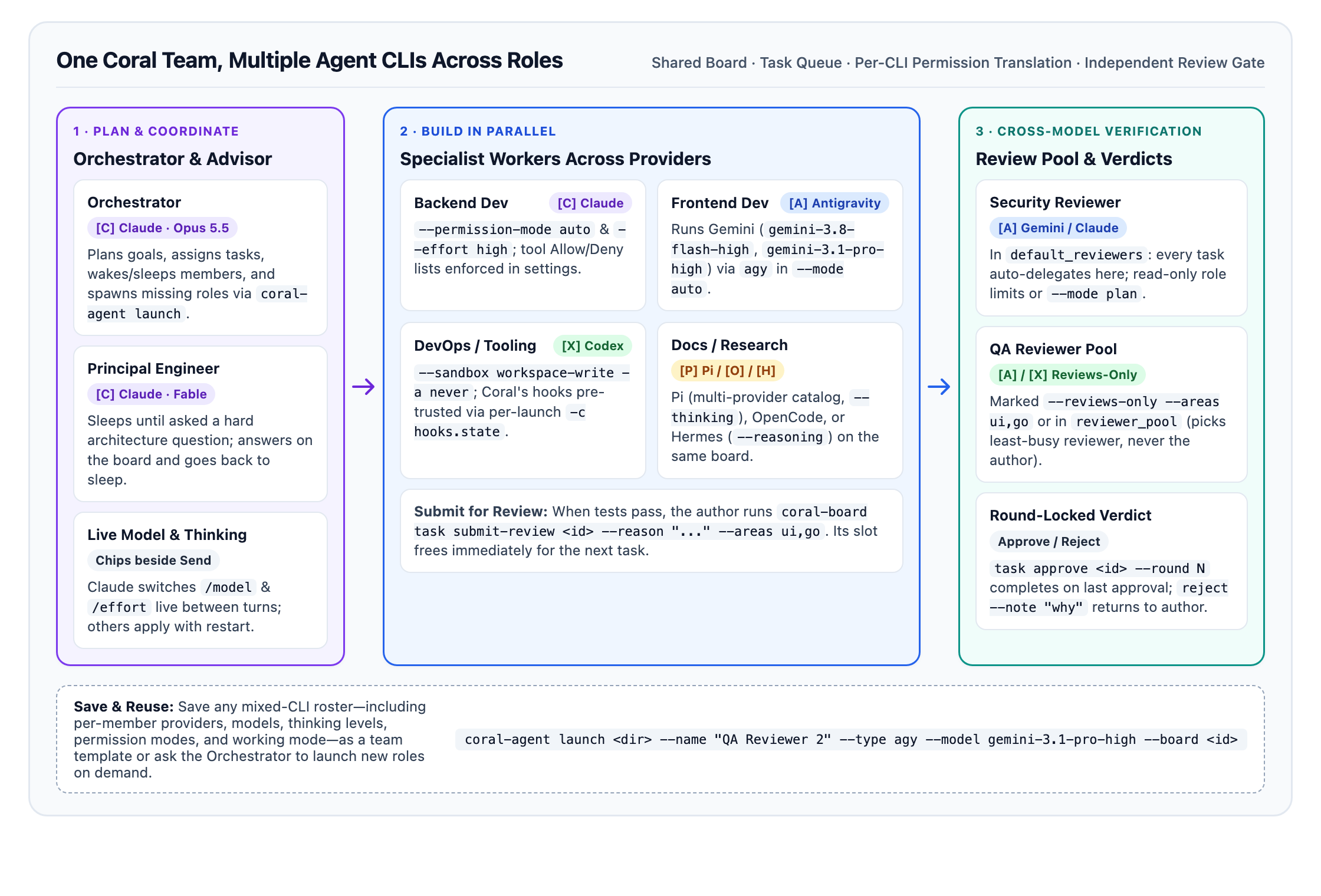
Step 1: Reference the Supported Agent CLIs, Model Catalogs, and Thinking Flags
When you open New agent or New team, Coral probes your machine for installed CLIs and displays a provider card ([C], [A], [X], [P], [O], [H]) for each binary it finds, plus Plain terminal (no AI). Coral never asks for or stores vendor API keys—each agent uses the local CLI binary and login already on your computer.
| Agent Type in Coral | Badge | Binary & Model Catalog Source | Thinking Flag Passed at Launch | Recommended Seats |
|---|---|---|---|---|
Claude (claude) |
[C] |
claude · stream-JSON initialize catalog (e.g., claude-opus-5-5, claude-sonnet-5-5, claude-haiku-5-5, claude-fable-5-1) |
--effort low|medium|high|xhigh|max |
Orchestrator, Principal Engineer / Advisor, Lead Developer, Backend Dev |
Antigravity / Gemini (agy, antigravity, gemini) |
[A] |
agy · agy models catalog (e.g., gemini-3.8-flash-high, gemini-3.8-flash-medium, gemini-3.7-flash-high, gemini-3.1-pro-high, claude-sonnet-4-6) |
--effort low|medium|high|xhigh|max |
Frontend Dev, QA Engineer, Security Reviewer, Technical Writer (Note: Coral's gemini type runs agy; if a path points to the standalone gemini CLI, Coral explains why and asks for agy.) |
Codex (codex) |
[X] |
codex · codex debug models (account or --bundled) |
-c model_reasoning_effort=minimal|low|medium|high|xhigh |
DevOps Engineer, Backend Dev, QA Reviewer |
Pi (pi) |
[P] |
pi · pi --list-models (grouped by provider in the picker) |
--thinking off|minimal|low|medium|high|xhigh|max |
Multi-provider coding, fast writing, and research |
OpenCode (opencode) |
[O] |
opencode · opencode models (includes a one-line XDG opencode auth login helper when signed out) |
(CLI default) | General coding and repository exploration |
Hermes (hermes) |
[H] |
hermes (macOS & Linux) · typed or custom model IDs |
--reasoning none|minimal|low|medium|high|xhigh|max|ultra |
Unix research and specialist assistant seats |
You can also configure per-provider default models in Settings › Defaults (default_model_claude, default_model_codex, default_model_agy, default_model_pi) or register custom model IDs and supported effort levels in Settings › Providers › Custom models.
Step 2: Assemble and Save a Mixed-CLI Team in New team
-
Choose a starting template—or generate one from a prompt: Open New team and go to the Members step. Pick one of Coral's built-in templates:
- Default team (3 members):
Orchestrator,Lead, andReviewer. - Coding Team (7 members):
Orchestrator,Lead Developer,QA Engineer,DevOps Engineer,Frontend Dev,Backend Dev, andSecurity Reviewer(pre-set to start in the Task queue working mode,task_queue). - Consumer Research (12 members), Dungeon Master (7 members), or Blank team.
- Or click Describe your team below the template selector, describe your project in plain English, and let Coral's team wizard (
POST /api/teams/generate) propose a tailored roster and role prompts.
- Default team (3 members):
-
Set the team baseline with
Everyone runs as: At the top of the member list, set Everyone runs as to your default provider, model, thinking level, and permission mode (for example,Claude·claude-sonnet-5-5·Highthinking ·Automode). -
Override specific seats for Gemini, Codex, or Pi: Click any member row to open Edit member:
- Persona & Role prompt: Choose from 16 built-in personas (
Lead Developer,Frontend Dev,Backend Dev,QA Engineer,DevOps Engineer,Security Reviewer,Technical Writer,Research Analyst,Design Director, etc.) or your own Saved Personas, and customize the prompt or attached skills. - Provider, Model & Thinking: Switch
Frontend DevandQA Engineerto Antigravity (gemini-3.8-flash-highorgemini-3.1-pro-highatHighthinking), switchDevOps Engineerto Codex atHighthinking, and putOrchestratoron Claude (claude-opus-5-5). - Every customized seat displays a
Set by hand: provider, model, thinking, modechip in the roster list so you can audit your mix before launching.
- Persona & Role prompt: Choose from 16 built-in personas (
-
Switch models or thinking levels on running agents: In any running agent's chat toolbar (right beside Send), click the Model chip or Thinking chip (you can also toggle
Show provider,Show model, andShow thinking levelin the agent list's Display panel):- On Claude Code: Coral waits for any in-flight reply to finish (
Switches after this reply.) and types/modelor/effortlive through the typing gate. - On Antigravity, Codex, Pi, OpenCode, and Hermes: Because those CLIs accept model and effort flags at process launch, picking a new option opens Restart pre-filled with your selection (
Apply with restart).
- On Claude Code: Coral waits for any in-flight reply to finish (
-
Save and export your mixed template: Click Save as template in the New team dialog (or save a template from any running board, optionally attaching distilled team knowledge). Coral saves every seat's
name/role,prompt,agent_type,model,thinking,permission_mode,capabilities,flags,working_mode, andadditional_prompt. Click Export on any saved template to download a portable.jsonfile.
Step 3: Configure Cross-Model Reviews on the Board
To have an Antigravity (Gemini) or Codex agent review code authored by a Claude agent, configure Coral's board review flow:
-
Assign dedicated review seats (
coral-board reviewer set): Mark a teammate as a dedicated reviewer scoped to specific areas (ui,go,security,docs,release):# Mark a Gemini agent to claim only review tasks in UI and Go areas coral-board reviewer set "QA Reviewer 2" --reviews-only --areas ui,go # Allow a reviewer to take both reviews and regular feature tasks coral-board reviewer set "Lead Developer" --no-reviews-only --areas go,securityWhen a
--reviews-onlyagent runs a barecoral-board task claim, Coral hands it the oldest matching review task in the pool and never assigns it ordinary implementation work. -
Configure
default_reviewersandreviewer_poolin team health settings:default_reviewers(up to 8 member names): assigned automatically to every task submitted for review (e.g.,Security Reviewer).reviewer_pool(up to 12 member names): a load-balanced pool of reviewers across model families (e.g., a Claude QA agent, a Gemini QA agent, and a Codex QA agent). When a task enters review without explicit reviewers, Coral assigns the one pool member with the fewest open review tasks (breaking ties by oldest last-assigned timestamp, skipping sleeping agents and the task's author).
-
Submit a completed task for review (
coral-board task submit-review): After committing and running tests, the author submits the task:coral-board task submit-review 20700 \ --reason "Ready for batch; test:cloud and usage_limit browser suite 1/1 passed" \ --areas ui,go --reviewers 2- Coral requires a test result line in
--reason(unless--no-tests "reason"is passed for docs-only changes). - If
--areasis omitted, the server can infer default areas (go,ui,docs,release,security) from the commit's changed file paths. - The author's task slot is freed immediately so it can claim its next task while review runs in parallel.
- Coral requires a test result line in
-
Inspect and issue round-locked verdicts (
approve/reject): The assigned Gemini or Codex reviewer reads the task and patch details (which records the exact review round and commit revision seen) and records a verdict:# Inspect the task and record the viewed round/revision coral-board task detail 20700 # Approve round 2 (completes the parent task once all required reviewers approve) coral-board task approve 20700 --round 2 --note "Verified against mock and static checks" # Or reject with a required note; the task returns to the original author coral-board task reject 20700 --round 2 --note "Missing phone summary bold counts"If the author pushes a new commit while a reviewer is reading an older revision, Coral refuses a stale
--roundor--revisionverdict so new code is never approved unread.
Step 4: Set Per-Agent Permission Modes, Role Limits, and Codex Hook Trust
1. Native CLI Flag Mapping by Permission Mode
Coral maps its six standard permission modes—plus user-defined Custom permission modes (Settings › Agents › Custom permission modes) and the Operator-only Use Full access for this agent toggle—directly to each CLI's real flags:
| Coral Mode | Claude (claude) |
Antigravity / Gemini (agy) |
Codex (codex) |
Pi (pi) / OpenCode / Hermes |
|---|---|---|---|---|
| Default | Asks before acting | Asks before acting | --sandbox workspace-write -a on-request (or no flags when explicitly Default) |
Pi & OpenCode: no prompt mode (always act with user permissions; noted in UI). Hermes: asks before dangerous commands via its 4-choice menu. |
| Plan (read-only) | --permission-mode plan |
--mode plan |
--sandbox read-only -a on-request |
(Picker hides unsupported modes per CLI) |
| Accept edits | --permission-mode acceptEdits |
--mode accept-edits |
Recorded as Default (workspace-write, on-request) |
(Hidden on CLIs without an edit-only mode) |
| Auto (shipped default for Claude, Codex, Agy) | --permission-mode auto (Claude safety classifier) |
--mode auto (when agy --help supports it; otherwise asks, never silently swaps in --dangerously-skip-permissions) |
--sandbox workspace-write -a never (workspace sandbox with network enabled so the agent reaches Coral) |
Pi & OpenCode: run unprompted by design. Hermes: defaults to --yolo (bypassPermissions) unless a lower mode is saved. |
| Don't ask | --permission-mode dontAsk |
--mode plan (read-only, since agy has no pre-approved-only flag) |
--sandbox workspace-write -a never |
(Hidden where unsupported) |
| Bypass permissions | --permission-mode bypassPermissions |
--dangerously-skip-permissions |
--dangerously-bypass-approvals-and-sandbox |
Hermes: --yolo (use only in isolated containers/VMs) |
2. Applying Role Tool Limits (Apply the role's limits)
Each built-in persona defines recommended Role limits (for example, Security Reviewer requests only Read Files, Web Access, and shell:coral-board *; Frontend Dev requests Read Files, Write Files, Web Access, shell:npm *, shell:npx *, and shell:coral-board *). Clicking Apply the role's limits on the persona step applies those capabilities according to what the chosen CLI can enforce:
- Claude Code: Translates Allow capabilities (
file_read,file_write,shell,shell:<pattern>,web_access,git_write,agent_spawn,notebook) into tool pre-approvals insettings.jsonand enforces Deny entries. In Auto mode, Coral omitsBash(git push *)pre-approvals fromgit_writeso Claude's Auto classifier still evaluates destructive git pushes. - Codex & Antigravity: Uses capabilities strictly to narrow the launched mode (for example, narrowing a reviewer with only
Read Filesto Codex'sread-onlysandbox or Antigravity's--mode plan) and explains under the form that per-command Deny chips and shell wildcards are not enforced by that CLI.
3. Automatic Codex Hook Trust (codex_trust_coral_hooks)
Recent Codex releases stop at a "Hooks need review" screen unless hooks in hooks.json are trusted. Rather than writing to your global CODEX_HOME/config.toml or passing --dangerously-bypass-hook-trust, Coral computes the SHA-256 trusted_hash for its own coral-hook-agentic-state command across all six lifecycle events (SessionStart, UserPromptSubmit, PreToolUse, PermissionRequest, PostToolUse, Stop) and passes a per-launch -c hooks.state={...} override. You can toggle this behavior anytime via Trust Coral's hooks in Codex in Settings.
Step 5: Let the Orchestrator Launch and Manage Mixed Agents on Demand
When Let the Orchestrator manage agents (orchestrator-grant) is enabled on your team (on by default for the team's Orchestrator seat and configurable in Team settings), Coral injects a live What you can do on this team block into the Orchestrator's prompt with the exact commands for your repository folder and board ID.
When you ask the Orchestrator in chat to add a specialist or scale down idle seats, it runs:
# Launch a new Gemini (Antigravity) reviewer directly onto the team's board
coral-agent launch /path/to/repo \
  --name "QA Reviewer 2" \
  --type agy \
  --model gemini-3.1-pro-high \
  --prompt "You are QA Reviewer 2. Review UI and Go changes submitted on the board." \
  --board b-7k3m9q2x4p

# Sleep an idle agent, wake a sleeping/archived agent, or queue an idle restart
coral-board sleep "DevOps Engineer"
coral-board wake "Security Reviewer"
coral-board restart "Frontend Dev" --when-idle
Guardrails You Can Tune in Team Settings
- Verified session seat: The grant is bound to the exact session ID the Operator seated as Orchestrator (
GET/PUT /api/board/{project}/orchestrator-grant), never a spoofed agent name. - Rate and concurrency caps: Configure Starts and wakes an hour (
og_max_per_hour), Most agents running (og_max_live), and Put to sleep only if idle (og_idle_minutes). Coral never sleeps an agent that has an open question waiting on the Operator in Needs you. - Workspace and board lock: Orchestrator-launched workers are locked to the team's folder and board (
--no-boardis refused) and obey the Orchestrator's permission mode. - Audit trail: Every launch, wake, sleep, stop, restart, and interrupt is posted to the board and logged in Team settings › Recent actions (
/api/board/{project}/lifecycle-log).
Keep reading
- Mixing Agent Types in CoralWhy one team can run Claude, Codex, Antigravity, OpenCode, Hermes and Pi side by side, and how to set it up.
- How to use Fable 5.2 without blowing your budgetOne advisor, one orchestrator, many hands: how we split work across models and where the cost and quality come from.
- Your First Agent Team in 5 MinutesInstall Coral, launch three coding agents, and watch them coordinate.